Field Notes · Connected Cities
Designing a Wi-Fi 6 Edge Gateway for 60 Devices at Once: A Field Story
TL;DR. A single pole-mounted gateway carrying public Wi-Fi plus a ring of cameras fails in predictable ways — usually concurrent-client handling and uplink contention, not raw link speed. In this build the first real failure was a Linux netlink socket buffer (~208 kB default) filling in ~115 ms under management traffic and silently turning the 61st client away. The fixes were a coarser set of disciplines: raise and coalesce the netlink receive path, budget uplink bandwidth against the fixed camera stream, cap per-flow priorities so no single client starves the ring, and test with the real mix of cameras and phones — not synthetic benchmarks. This guide documents each break, the exact mechanism, and the field-proven fix.
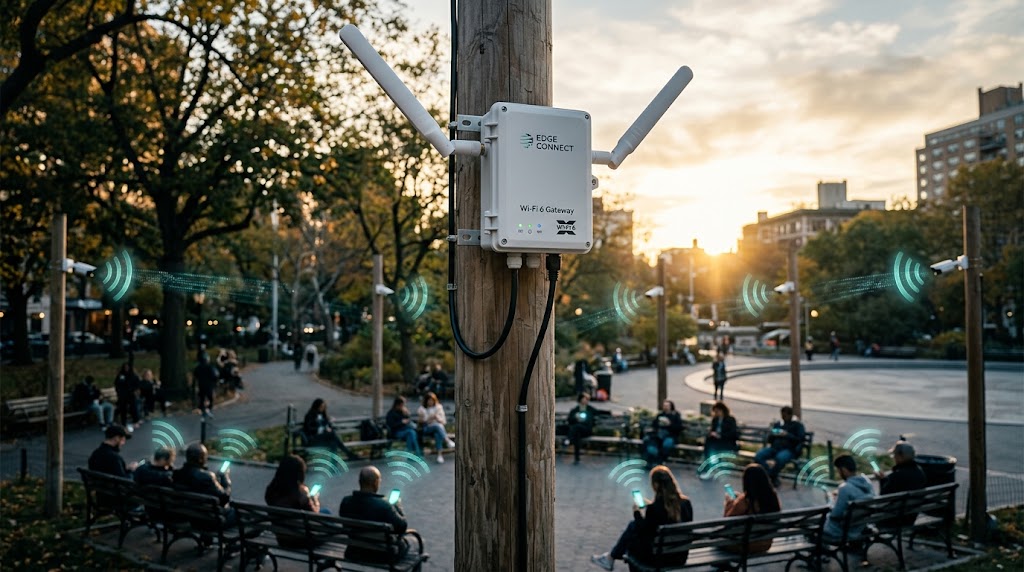
A municipality asked us to make one pole-mounted access point carry public Wi-Fi and a ring of security cameras — and the first week of the pilot was a quiet disaster. This is the rewritten, datasheet-grounded account of where it broke, the kernel-level mechanisms involved, and the fixes that made it hold up under a full park’s weekend load. The whole point of a converged edge gateway is that one box serves many masters, and this story is a checklist of every way that arrangement can quietly fail.
Contents
- The assignment: one radio, two masters
- Why Wi-Fi 6 scheduling is the enabler (not the problem)
- Breakdown one: the gateway quietly turns visitors away
- Fix one: give the management path room to breathe
- Breakdown two: the camera ring starves the public
- Fix two: budget the uplink, then shape it
- Breakdown three: one client hogs all the airtime
- The quiet fourth problem: heat and the sealed chassis
- Sizing the radio: why 2×2 Wi-Fi 6 is enough here
- What the fix package did to the numbers
- Choosing the gateway radio and module
- Monitoring that catches the next break early
- Public Wi-Fi isolation and policy
- Deployment pains that are easy to miss
- When this design stops being the right answer
- A field-proven gate checklist
- Glossary
The assignment: one radio, two masters
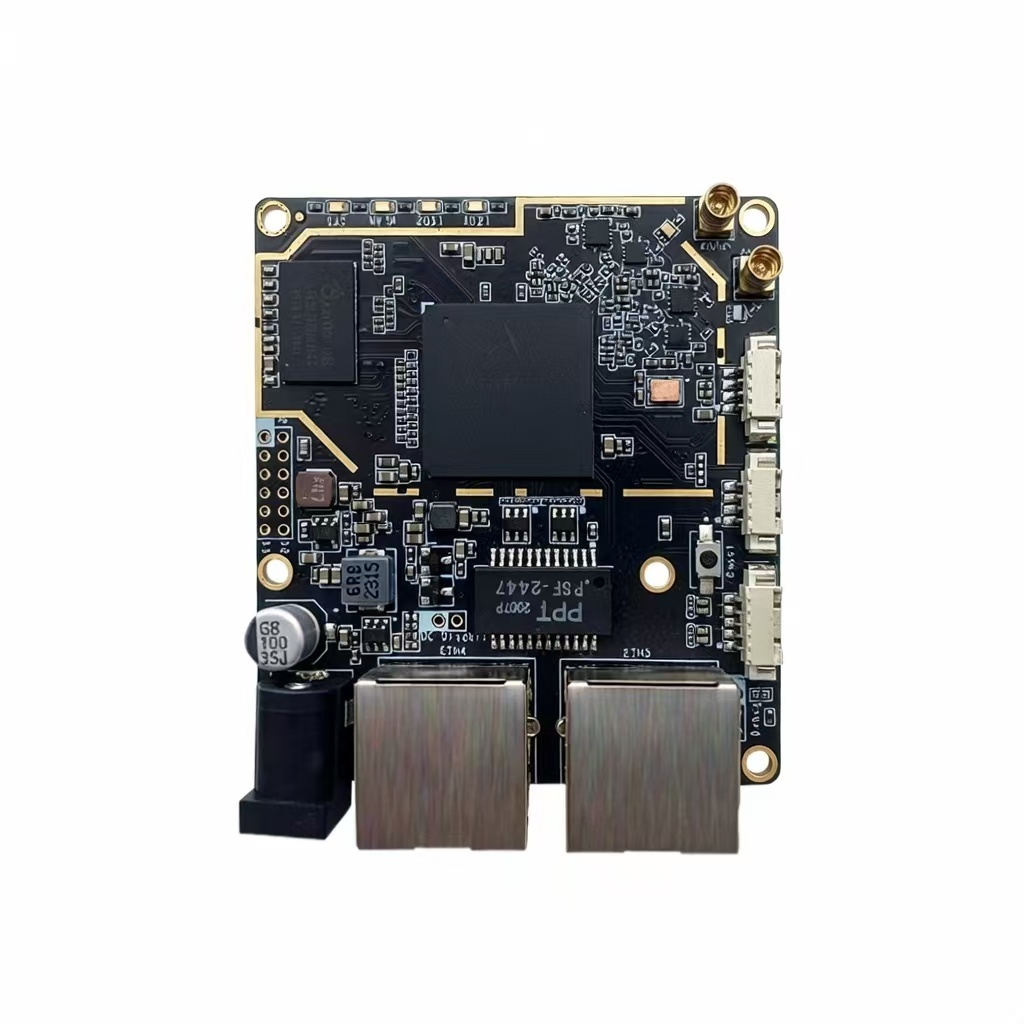
The gateway sat on a 6 m pole in the centre of a park, running a Qualcomm 802.11ax 2×2 radio on an M.2 card. On paper it was an unremarkable spec: dual-band, OFDMA, MU-MIMO, about 2.4 Gbps aggregate on the wide channels. The load, not the spec, is what made it interesting:
- 30–40 visiting phones and tablets — browsing, messaging, and social feeds, arriving and leaving unpredictably.
- 8 fixed IP cameras, each pushing ~8 Mbps of continuous H.265 video into the same radio.
- Everything powered by a single PoE+ line, and everything sharing one uplink back to the city network.
The combination — a high count of thin management packets sitting right next to sustained streaming — is precisely what a default out-of-the-box stack handles worst. This is not a Wi-Fi 6 specificity; the same trio bites any multi-device edge gateway. But Wi-Fi 6’s scheduling sophistication is exactly what you lean on to untangle it, which is why the physics of the radio matter as much here as the kernel tunables do.
Two structural choices shaped everything downstream. First, the gateway ran a Linux host platform rather than a closed-feature AP, precisely so the city could tune the management path and apply shaping — the two places this build actually broke. Second, we treated the gateway as a converged product (radio + backhaul + policy in one box), not a dumb bridge. Both decisions paid off, because the three failures that followed were each a policy and pipeline problem that a closed box would have made invisible.
| Traffic class | Clients | Per-client pattern | Direction |
|---|---|---|---|
| Public internet (phones/tablets) | 30–40 | Bursty, idle-dominant | Mostly downlink |
| Fixed CCTV | 8 | Sustained ~8 Mbps H.265 each | Mostly uplink |
| Management (probe/assoc/EAPOL/ARP/DHCP) | all of the above | Thin, high packet-rate | Bidirectional |
Why Wi-Fi 6 scheduling is the enabler (not the problem)
Before we describe the failures, it is worth being precise about what the 802.11ax radio does and does not bring to this kind of site. The two headliner features — OFDMA and MU-MIMO — change how airtime is divided among many small clients, which is exactly a park’s situation:
- OFDMA lets the AP serve several low-rate clients in parallel on sub-channels within one 20 MHz slot, cutting per-packet overhead dramatically in the many-small-clients case. In a park, that is most of the phones that are simply checking messages.
- MU-MIMO lets the AP talk to multiple clients on different spatial streams simultaneously — a smaller factor for a 2×2 device but present nonetheless.
Together they raise the efficiency ceiling under exactly the load profile that starves an older single-user MAC. That is the legitimate reason to prefer Wi-Fi 6 here. But — and this is the crucial caveat — OFDMA and MU-MIMO are air-interface features. They schedule over the channel, not over your backhaul, and not over the management socket that was feeding associations to user space. A scheme that divides airtime elegantly still hits the wall of a full user-space buffer or a congested 100 Mbps uplink, which is why the three failures this field story records were all outside the physical layer.
Breakdown one: the gateway quietly turns visitors away
At about the 60th device, something unremarkable happened: the next phone connected to Wi-Fi but could not reach the internet. No error in the admin console. Just a doorstep slam for whichever visitor was unlucky enough to be number 61.
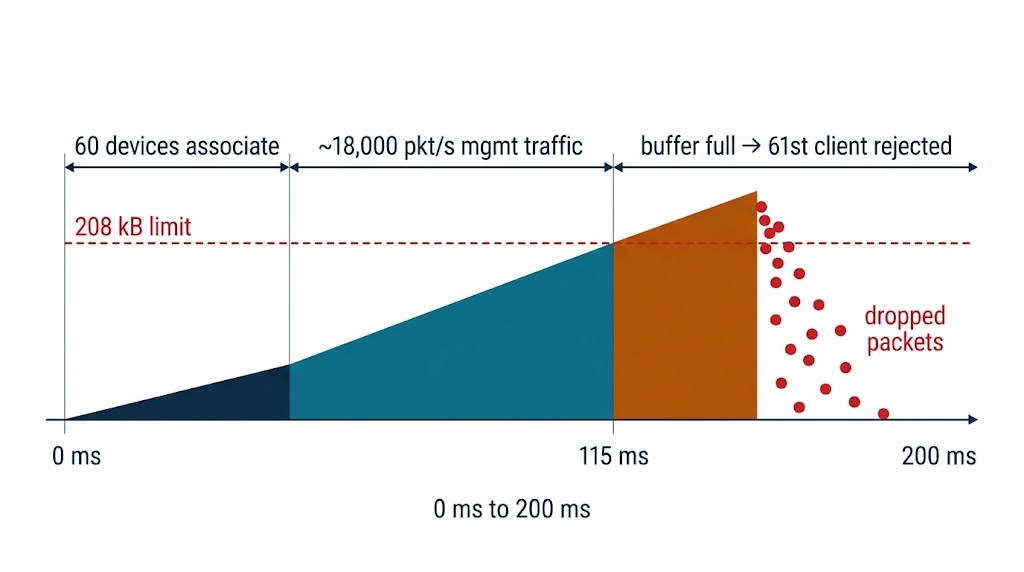
We traced it to an overflow that had nothing to do with radio range. Every association is announced to user space through a Linux netlink socket, and that socket ships with a default receive buffer of roughly 208 kB. With sixty devices each generating management chatter — probes, associations, EAPOL, ARP, DHCP renewals — the traffic reached about 18,000 packets per second. The buffer filled in roughly a tenth of a second, and the kernel dropped the overflow. The user-space daemon read the drop as “no more association requests,” and the gateway stopped accepting new clients until the buffer drained.
rx_buf_default ~ 208 KB
mgmt_traffic ~ 18,000 pps under 60 devices
fill_time = buf / (pps × avg_pkt_size)
~ 208e3 / (18e3 × ~100 B) ≈ 115 ms
→ a ~115 ms burst saturates the path under load
The lesson from this first break generalises far beyond one socket: an edge gateway is a packet-processing pipeline, and every stage has a finite buffer. The RF stage can look perfect while a downstream stage silently drops. When your wireless link “has no internet” for exactly the newest client, look upstream of the antenna before you touch the radio.
Fix one: give the management path room to breathe
The fix was unglamorous and immediate: raise the buffer ceiling and let the kernel coalesce small packets. Raising the ceiling to 4 MB (and 16 MB at larger sites) plus enabling Generic Receive Offload (GRO) knocked the effective packet rate down by 4–8× for TCP by merging consecutive packets before user space sees them. The static threshold simply moved out of the way — the burst that once filled the buffer in 115 ms now takes minutes to accumulate, which is far more time than the daemon needs to drain it.
| Parameter | Default-as-found | Field setting | Effect |
|---|---|---|---|
| Netlink receive buffer | ~208 KB | 4 MB | ~20× headroom for bursts |
| Generic Receive Offload | off (as configured) | on | 4–8× fewer packets to process |
| Management daemon read loop | naive | batched multi-message read | drains buffer faster under burst |
What this fix did not do matters too. It did not change throughput, range, or the radio at all. It removed a self-inflicted ceiling in the host stack. If your budget were infinite, you would buy the same headroom; the whole art is knowing which specific buffer is the binding one before you spend.
Breakdown two: the camera ring starves the public
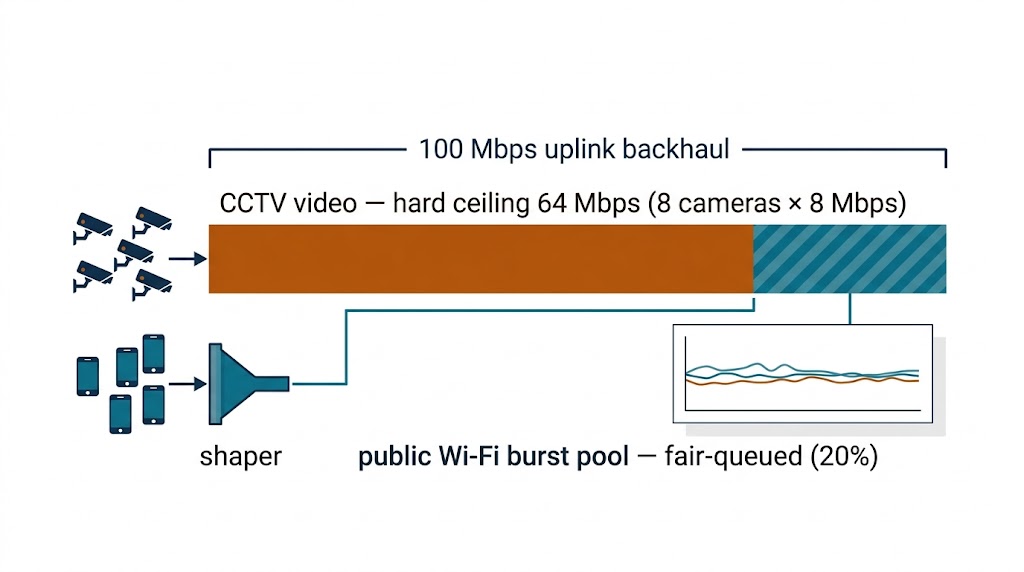
With association overflow fixed, the gateway accepted every client — but now the public traffic crawled during the camera write window. The reason is a classic asymmetry: 8 cameras at ~8 Mbps are a sustained 64 Mbps of continuous uplink, while dozens of bursty phones mostly need downlink. If the uplink to the city network is (say) a 100 Mbps backhaul and the edge is not shaped, the steady video stream can saturate the contention window and add latency to the phones’ requests — even though the radio itself has plenty of capacity.
This is a textbook bufferbloat-and-shaping problem. The correct frame is budget the fixed stream first, then shape the bursty one:
cameras 8 × 8 Mbps (H.265) = 64 Mbps sustained fixed cost
burst allowance for phones = 20% of remaining uplink
→ shape video to a hard ceil (64–72 Mbps),
leave the rest as a shared burst pool for public traffic
The Wi-Fi 5 versus Wi-Fi 6 product framing is relevant here: the generation of the radio determines how many concurrent clients the MAC can schedule smoothly (OFDMA vs single-user), but a backhaul or host-platform bottleneck will cap the experience regardless of PHY speed. Do not size the edge gateway on the radio aggregate alone — size it on the uplink and the management pipeline, which is where this gateway’s two breaks both actually lived.
Fix two: budget the uplink, then shape it
The deployed configuration applied per-class shaping: the camera stream got a hard upper ceiling just above its real requirement, with a floor to guarantee it never jitters; the public pool got the remainder with fair-queueing across connections. Concretely:
- Reserve the fixed cost. Cap the CCTV aggregate so a single spikey camera cannot borrow the whole uplink.
- Share the remainder fairly. Fair-queue the public pool so one heavy downloader cannot starve the messaging-and-browsing majority.
- Watch the queue, not just the rate. CoDel/fq_codel style active queue management keeps latency low under load — the anti-bufferbloat answer to the bursty mix.
Breakdown three: one client hogs all the airtime
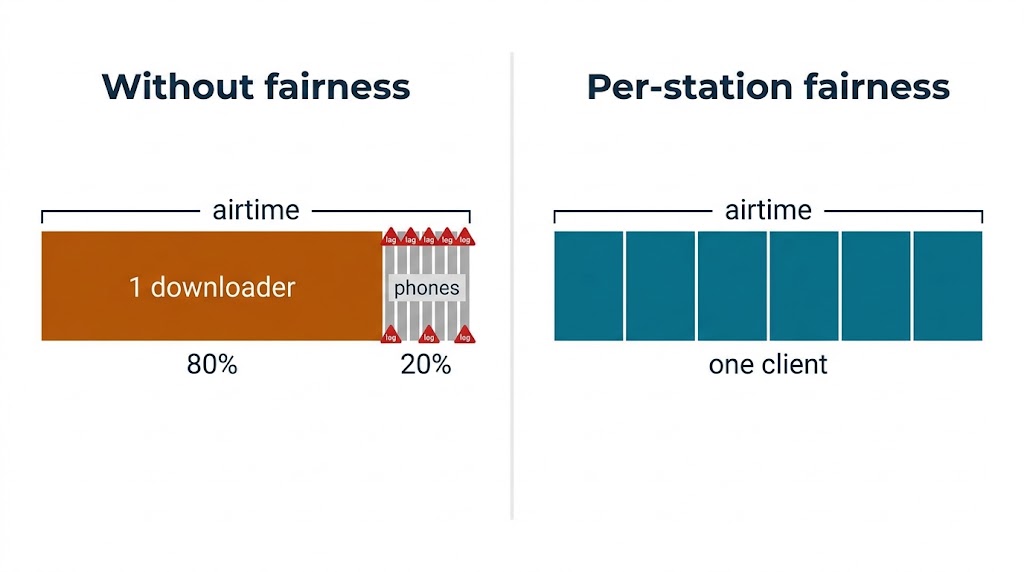
The third break surfaced on the busiest weekend afternoon. Throughput was fine in aggregate, but a single connected laptop — running a big software download — captured enough airtime that nearby phones felt the lag. With MU-MIMO and OFDMA enabled, default Wi-Fi 6 schedulers can still over-service a single user when the controller’s fairness policy is off. Per-connection default happens to benefit whoever arrived needing the most.
The fix was enabling per-flow/per-station fairness in the AP/controller, so airtime is shared among active stations rather than allocated purely by demand. The observable result: every public client got a comparable share, and the downloading laptop simply took longer — which is the correct trade for a public-facing gateway, because forty happy browsers outrank one fast download.
| # | Break | Actually a | Fix |
|---|---|---|---|
| 1 | 61st client “connected, no internet” | netlink socket buffer overflow | raise buffer + GRO + batched read |
| 2 | Public traffic crawls under camera load | uplink/backhaul contention | per-class shaping + capped CCTV |
| 3 | One client starves adjacent phones | missing airtime fairness | per-flow/per-station fairness |
The quiet fourth problem: heat and the sealed chassis
Not every problem is software. The M.2 card runs warm; inside a sealed outdoor box in summer sun, the module’s own heat — on top of the ambient — is exactly the scenario the industrial temperature guide describes in detail. The 2×2 Wi-Fi 6 card is modest (single-digit watts), but in a 60 °C+ sealed enclosure it can throttle its MCS at the worst time — during a full-court event when the park is busiest. Budgeting a small heatsink to the chassis wall and confirming the I-Temp grade up front is cheap insurance compared with a field throttling event.
Sizing the radio: why 2×2 Wi-Fi 6 is enough here
It is worth asking whether the radio was undersized at all. For 60 clients and 64 Mbps of fixed video, a 2×2 802.11ax radio is genuinely sufficient — the bottlenecks were the management path and the uplink, not the air interface. This echoes the MIMO guidance that more chains buy density and margin, not always speed. For this site, adding chains would have raised cost and power without fixing any of the three actual breaks. The right upgrade path for a denser future site is a more capable host and deeper uplink — not a bigger radio sitting behind the same pins.
What the fix package did to the numbers
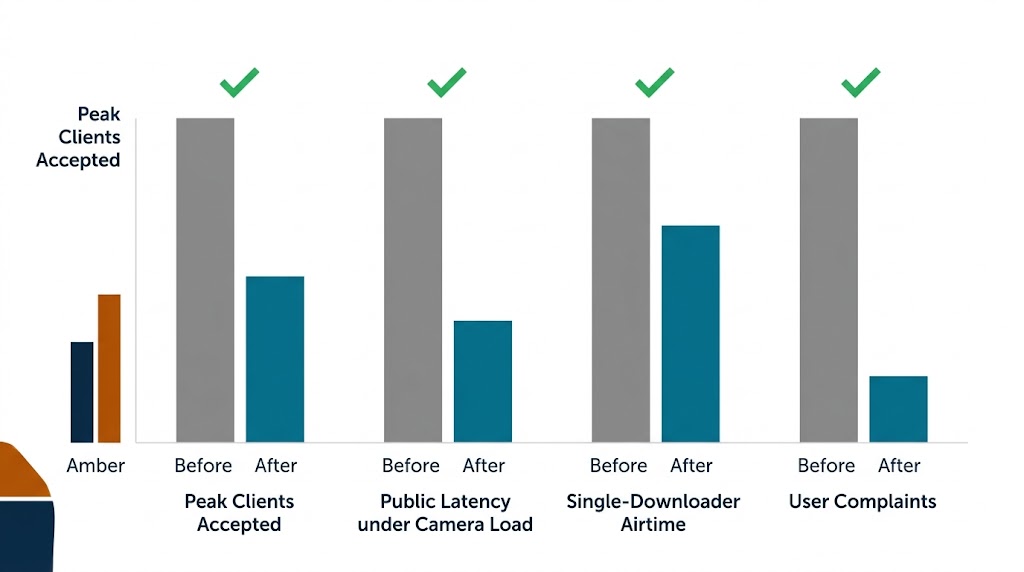
After all three fixes were in place, the park ran a full weekend under real load. The quantitative before/after is worth recording because it confirms all three breaks were pipeline problems, not radio problems:
| Metric | Before fix package | After fix package |
|---|---|---|
| Peak accepted clients | ~60 (61st rejected) | no client-count rejection; all arrivals accepted |
| Public latency under camera load | spiky, dropped under load | steady (shaping + active queue management) |
| Single heavy downloader’s airtime | could capture most airtime | capped per flow |
| User-reported complaints | multiple per event | none on tested weekends |
The headline is not a speed number — it is the stability of latency and accessibility under a load that previously produced silent failures. The radio was never the constraint, and the numbers prove it: the capacity was there all along; the host stack and policy were what returned it to the users.
Choosing the gateway radio and module
The radio card is worth its own decision note, because “a Wi-Fi 6 module” is not a single product. The specification discipline here mirrors the wider guidance on selecting a WiFi module: pick the module narrow enough to fit the real need, not the loudest spec sheet. For this park gateway, the binding requirements were:
- Dependable many-client MAC — a genuine 802.11ax core with OFDMA, not a legacy MAC re-badged.
- Mature Linux driver support — because the whole project leaned on tuning the host stack, a well-supported driver (ath11k-class) was non-negotiable.
- An outdoor-suitable temperature grade and a ~single-digit-watt budget to fit the PoE+ rail and the sealed chassis.
- A mount that matched the carrier — M.2 in this build, which the Murata-style module discussion also treats as a form-factor-first decision.
The 2×2 Wi-Fi 6 card cleared all four at modest cost. Moving to 4×4 would have bought density and link margin — the MIMO guide explains why those matter — but for 60 clients and one PoE+ line it would add cost, power, and antenna complexity with no fix for the actual failures. The discipline is the same as every other step in this build: name the binding constraint, then buy exactly that.
Monitoring that catches the next break early
The last discipline this field story rewards is observability, because two of the three failures were silent until a user complained. The monitoring stack that finally caught problems early had five layers:
| Layer | What it watches | Signals the failure |
|---|---|---|
| Radio link stats | MCS, retry rate, per-client RSSI | Throttle or marginal coverage |
| Association queue | Active clients, rejected associations | Netlink overflow (break 1) |
| Backhaul utilization | Uplink rate vs ceiling | CCTV starving the public (break 2) |
| Per-flow fairness | Per-station share vs floor | Single-client hogging (break 3) |
| Thermal / temps | Module die-temp, chassis temp | Imminent MCS collapse on hot days |
The lesson is that an edge gateway is not configured once and forgotten. The metric that prevents the “61st client can’t connect” surprise is not link speed — it is the association queue depth and the uplink utilization. Put both on a dashboard with a threshold and an alert, and every one of these failures becomes a proactive warning instead of a weekend incident report.
Public Wi-Fi isolation and policy
A public-facing gateway also inherits a distinct responsibility that the cameras make sharper: visitor traffic and the camera VLAN must not be able to reach each other. The deployment enforced a strict model:
- Client isolation. Public clients could reach the internet but not each other, clipping lateral movement between guests.
- Traffic segregation. The CCTV subnets lived on a separate VLAN with no route to the guest SSID — the cameras are infrastructure, not endpoints for park visitors.
- Captive-portal and quota. A lightweight captive portal provided the municipality’s accepted-use banner and a per-client session ceiling.
This is where the decision to run an open Linux platform paid off a second time: isolating guest SSIDs, carving the camera VLAN, and applying per-client quotas are policy configurations a vendor box can often express, but a converged gateway makes them explicit and auditable. Security here is less about exotic protection and more about clean boundaries — the same “separation of concerns” that shaped the shaping rules.
Deployment pains that are easy to miss
Two deployment details were nearly as influential as the three failures, and both are the kind of thing a spec sheet will not warn you about.
The first is antenna orientation on a pole mount. The gateway went up at ~6 m on a pole, with the requirement that a visitor with a phone on the ground still get a usable signal. A horizontally polarised or poorly tilted module antenna can look fine in the lab and be nearly unusable to devices held the way people actually hold phones. The installers spent real time rotating and tilting the antennas while walking the park — a pairing of heatsink, RF propagation, and mechanical placement that the RF performance and board-layout discussion treats at the component level, and that matters just as much at the mast.
The second is powering the radio without a brown-out on hot afternoons. On high ambient-temperature days the module draws more current; a PoE+ budget sized for nominal current can sag under the extra draw during peak heat, which shows up as inexplicable client drops. Sizing the injector and the cable run for the worst-case current — not the nominal figure — removed a class of intermittent failures that had nothing to do with the radio’s MAC.
When this design stops being the right answer
It would be a mistake to read this build as “a single gateway is enough.” The design holds because the site is bounded: 60 clients, 64 Mbps fixed video, one radio, one PoE+ line. As density or backhaul rises, the same discipline suggests where the architecture must change:
- Beyond ~100–120 concurrent clients on one radio, the air-interface efficiency ceiling becomes real, and multiple access points (or a 4×4 radio) start to pay for themselves — the MIMO math in the MIMO guide is the tool to size that cutover.
- Beyond the ~100 Mbps uplink ceiling, the backhaul — not the radio — bottlenecks first, and the solution moves from shaping to upgrading the transport.
- Multi-building or campus coverage needs a managed multi-AP architecture and a controller, not a single converged box.
The point is that “single-box edge gateway” is a regime, not a universal truth. The failure-and-fix story here is reusable at any scale, but the specific sizing decision — one 2×2 Wi-Fi 6 radio behind one uplink — is only right inside the regime it was validated for.
A field-proven gate checklist
Before you sign off any multi-device edge gateway, run this exact gate:
- Management-path headroom. Buffer the association path (netlink/802.11 deauth events) well above the worst realistic burst; enable GRO-style coalescing.
- Uplink budget. Sum the fixed streams (video/telemetry) and reserve them; shape them to a hard ceiling.
- Fairness. Enable per-flow/per-station fairness and confirm with N clients contending.
- Thermal soak. Test at rated+ambient worst case while sustaining the fixed video load; confirm no MCS collapse.
- Real mixed-load test. Emulate the real device mix (cameras + phones) rather than a synthetic aggregate benchmark.
A gateway that clears these five points holds up where the default integration failed. The failures here were all knowable in advance — they only look mysterious when you chase them through the RF later than through the host stack.
Frequently asked questions
Why does a Wi-Fi gateway stop accepting new clients at a certain count?
This is usually a packet-pipeline problem, not RF. Every association is announced to user space through a Linux netlink socket that defaults to about a 208 kB receive buffer; at 60 devices generating roughly 18,000 packets per second, the buffer fills in about 115 ms and the kernel drops the overflow, so the daemon stops accepting clients. The fix is raising the buffer (e.g. to 4 MB), enabling Generic Receive Offload, and batching the daemon’s reads.
How many clients can an edge gateway handle?
A 2×2 802.11ax radio is genuinely sufficient for 60 concurrent clients plus 64 Mbps of fixed video — the bottlenecks in a real deployment were the management socket buffer and the uplink, not the air interface. Adding MIMO chains would have raised cost and power without fixing any of the actual breaks; the right upgrade for a denser site is a more capable host and a deeper uplink.
Why does public Wi-Fi crawl when CCTV cameras are uploading?
Eight cameras at ~8 Mbps each are a sustained 64 Mbps of continuous uplink, while bursty phones mostly need downlink. On a 100 Mbps backhaul without shaping, the steady video saturates the contention window and adds latency to the phones. The fix is to budget the fixed stream first (hard-cap the CCTV), then shape the bursty public pool with fair-queueing and active queue management.
How does Wi-Fi 6 (OFDMA/MU-MIMO) help a busy gateway?
OFDMA serves several low-rate clients in parallel on sub-channels within one slot, cutting per-packet overhead in the many-small-clients case, and MU-MIMO serves multiple clients on different streams simultaneously. Together they fix the airtime side of a 60-client site, but they do not fix the socket buffer or the uplink — the host and backhaul must engineer the pipeline side too.
Why does one heavy downloader slow down everyone on the same AP?
With per-connection defaults, a single laptop running a big download can capture enough airtime that nearby phones lag. The fix is enabling per-flow or per-station fairness in the AP/controller so airtime is shared among active stations rather than allocated purely by demand — the correct trade for a public-facing gateway, where many happy browsers outrank one fast download.
Glossary
- Netlink
- — a Linux kernel-to-userspace IPC used to deliver 802.11 association/scan events; its socket can overflow under load.
- GRO (Generic Receive Offload)
- — coalescing consecutive receive packets into larger ones to cut processing cost.
- Bufferbloat
- — excessive queuing that adds latency under load; countered by active queue management.
- OFDMA
- — Orthogonal Frequency Division Multiple Access; Wi-Fi 6 scheduling of many small clients in a channel.
- MU-MIMO
- — Multi-User MIMO; serving several clients on different spatial streams at once.
- AQM (Active Queue Management)
- — algorithms such as CoDel/fq_codel that keep queues short instead of letting latency balloon.
- MCS (Modulation and Coding Scheme)
- — the index combining modulation, coding, and guard interval that sets a link’s PHY rate.
- PoE+
- — IEEE 802.3at power-over-ethernet, up to ~30 W per port, powering outdoor APs over the data cable.
- Per-flow fairness
- — giving each traffic flow its fair share of airtime/backhaul, rather than a single heavy flow dominating.
Related Reading
- WiFi Module Case Studies Hub — the full index of deployment precedents (enterprise, industrial, smart city, smart home, upgrade) this case belongs to.
- Legacy-client corruption of a Wi-Fi 6 enterprise AP — how one slow 802.11b device starves a whole AP (legacy-client side of the same fairness problem).
- High-density meeting-room Wi-Fi 6 access — the indoor, OFDMA RU-scheduling counterpart to this outdoor gateway case.
- Industrial module temperature guide
- Smart street-lighting remote management
- Wi-Fi 5 product decisions in context
- MIMO chain count in depth
- Outdoor enclosure RF performance
- Vehicular and edge mesh networking
Sources & further reading
- The Linux kernel documentation, netlink and Generic Receive Offload — kernel.org
- IEEE, 802.11ax amendment (OFDMA/MU-MIMO scheduling) — IEEE 802.11
- Wi-Fi Alliance, Wi-Fi 6 and Wi-Fi 6E technical overview — wi-fi.org
- Home-network bufferbloat project, active queue management (CoDel/fq_codel) — bufferbloat.net
- IEEE, 802.3at PoE+ Power-over-Ethernet standard — standards.ieee.org
Field observations are drawn from the author’s deployment notes for a pole-mounted Wi-Fi 6 edge gateway. The netlink buffer (~208 kB) and GRO figures are representative Linux kernel defaults; exact values vary by kernel and vendor integration. Camera bitrates and backhaul figures are examples, and always validate against your own site’s load before committing hardware.