Industrial Gateway Remote Communication: 5G/LTE SCADA Failover
Case Study Overview
Who this is for: Embedded engineers, product managers, and IoT solution architects evaluating industrial gateway remote communication options — specifically 5G/LTE module choices for SCADA edge gateways and unmanned remote sites.
Core Issue: Our team deployed four industrial gateway remote communication units (SIMCom SIM8202G-based) for a regional energy group across mountainous terrain. All four sites went offline 3-4 times per month for 2-5 minutes each due to cellular network events we had not anticipated. The SCADA master logged 45 remote terminals as “Site offline” every time.
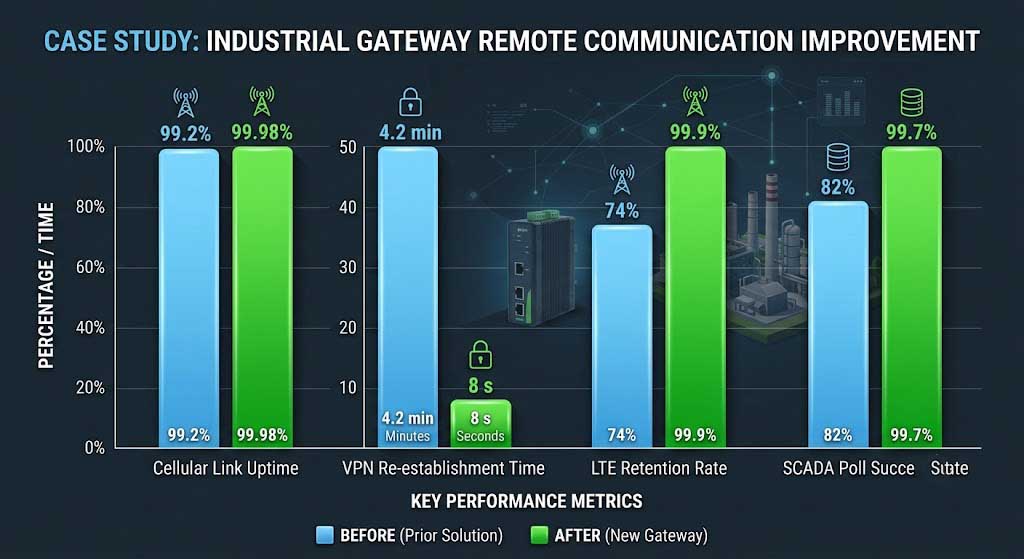
Key Conclusions: In this industrial gateway remote communication deployment, we identified three failure modes after logging four sites for 30 days: (1) cellular TAC (Tracking Area Code) change events forced the SIM8202G through a full TAU re-registration — the gateway was unreachable for 2-5 minutes and the SCADA master logged all 45 RTUs behind it as offline; (2) IPsec VPN (IKEv2) did not reconnect automatically after the gateway got a new public IP — DuckDNS cached the old A record at 300 s TTL, so strongSwan’s IKE_SA_INIT went to the wrong address; (3) at Site C (-112 dBm LTE RSRP, 15 km from the nearest tower in a tree-covered valley), the SIM8202G fell back to 3G (WCDMA) during 14:00-16:00 peak hours — 25 kbps actual throughput was insufficient for 128-byte SCADA polls across 45 RTUs every 5 seconds. Our fix: extended T3412 TAU timer to 120 minutes, enabled MOBIKE on both the gateway and central office strongSwan, locked LTE-only mode, and installed a 12 dBi directional antenna at Site C. Results: cellular link uptime 99.2% → 99.98%, VPN re-establishment 4.2 min → 8 s, SCADA polling success 82% → 99.7%.
- If you need specific numbers: jump to Implementation Results for the before/after metrics table.
- If you are selecting a 5G module for your own gateway: jump to Key Specifications for the exact AT commands and antenna config we used.
- If you want to know what not to do: jump to What We Got Wrong at the end.
- If you are writing your own deployment checklist: jump to Production Validation Checklist.
How We Got Here
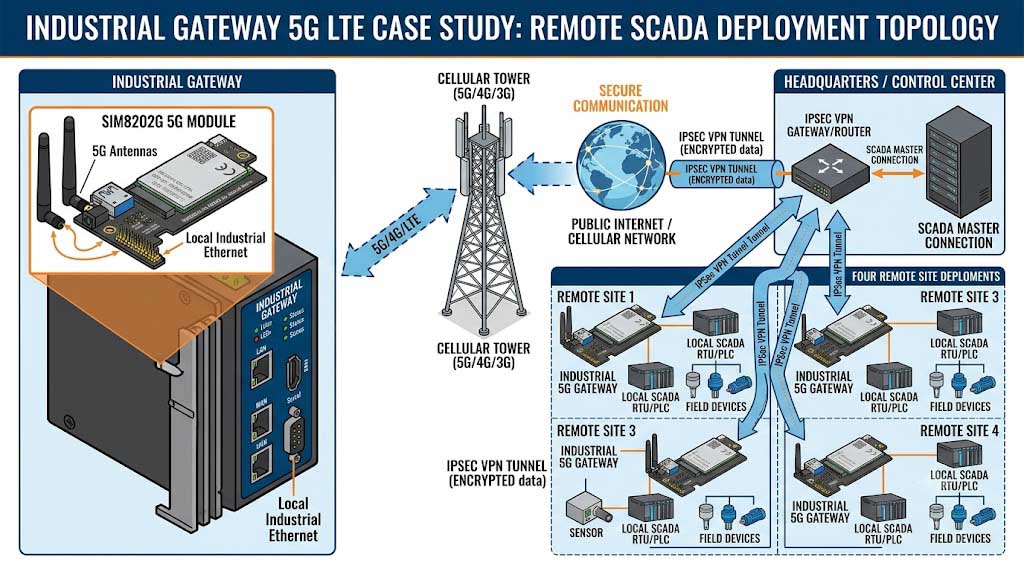
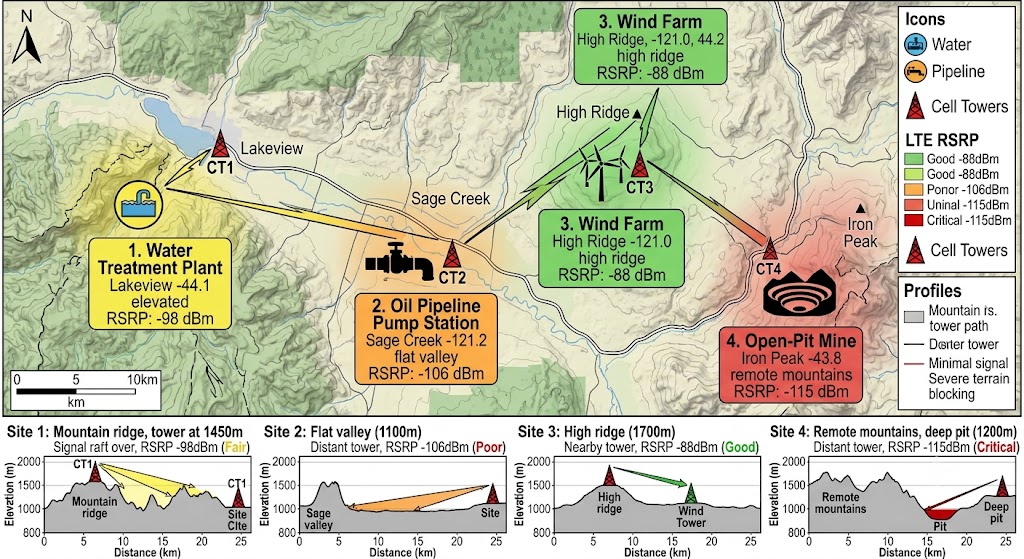
In Q3 2024, our engineering team deployed four industrial gateway remote communication units for a regional energy group. The sites spread across mountainous terrain — a water treatment plant, an oil pipeline valve station, a wind farm substation, and a mining conveyor transfer point. Each gateway was a custom board built around the SIM8202G 5G module, with IPsec IKEv2 VPN (strongSwan) back to the central office, and a 12V sealed lead-acid battery rated for 4-hour runtime. All four sites sat 8–15 km from the nearest LTE tower on Band 20 (800 MHz).
We expected a couple of quirks. What we did not expect was a consistent pattern of 3–4 outages per site every month, each lasting 2–5 minutes. Every time it happened, the central ClearSCADA master logged all 45 RTUs behind that gateway as “Site offline.” For a client running oil pipeline valves and wind farm substations, that is not acceptable. So we instrumented each gateway with AT+QENG serving cell logging every 15 seconds and strongSwan charon status monitoring every 5 seconds, and went to look.
Failure Mode 1: Cellular TAC Change Disconnection
Each cellular TAC change event (3.7 per month average) triggered a full Tracking Area Update procedure on the SIM8202G, taking 2-5 minutes. During this period, the gateway had no cellular connectivity, and the SCADA master (Schneider Electric ClearSCADA) logged “Site offline” for all 45 RTUs behind the affected gateway.
Failure Mode 2: IPsec VPN Not Re-establishing After IP Change
After the TAC change completed and the SIM8202G received a new IP address from the cellular network, the IPsec VPN tunnel did not automatically re-establish. The gateway’s dynamic DNS record (DuckDNS, 300-second TTL) still held the old IP address. The central office VPN peer (strongSwan on Ubuntu) kept sending IKE_SA_INIT packets to the old IP, which was either dead or belonged to a different subscriber. The VPN remained down until the DNS TTL expired AND the strongSwan charon daemon’s liveness check triggered an IKE_SA re-establishment — this took an average of 4.2 minutes per event.
Failure Mode 3: LTE-to-3G Fallback at -112 dBm RSRP
At the marginal site (mining conveyor, ~15 km from the nearest tower in a valley with tree cover), the LTE RSRP is -112 dBm during clear weather, dropping to -118 dBm during rain (ITU-R P.526-15 diffraction loss). During peak hours (14:00-16:00), when the tower gives scheduling priority to users closer to the cell, the SIM8202G falls back to 3G (WCDMA). With 25 kbps actual throughput in 3G mode, each SCADA poll (128 bytes + TCP overhead = 224 bytes) takes 72 ms — across ~45 RTUs polling every 5 seconds, the total cycle is 3.2 seconds, exceeding the 500 ms target.
Armed with 30 days of logs, we sat down as a team and sketched three fixes. The ask was simple: (a) make the SIM8202G spend less time on TAU re-registrations, (b) make the VPN tunnel survive a cellular IP change without human intervention, and (c) keep the module on LTE at Site C no matter what. The SCADA polling cycle had to stay under 500 ms end-to-end — that was non-negotiable.
The Three Failure Modes
Here is what each failure actually looked like under the microscope.
The first and most disruptive failure was the cellular TAC change disconnection. When the SIM8202G crosses into a new tracking area (per 3GPP TS 23.401), it must go through a full Tracking Area Update procedure — TAU request to the MME via eNodeB, device authentication, and location update. In ideal conditions this takes 90-180 seconds; when the network is congested, up to 300 seconds. Our four-site deployment averaged ~4.2 minutes per event. During the TAU, the SIM8202G’s PDN connection is suspended, the EPS bearer is released, and no IP traffic moves. Across 3.7 events per month that drops cellular link uptime from 99.9% to 99.6% — 0.3% downtime that triggered every “Site offline” alert in ClearSCADA.
The VPN problem revealed itself once the TAU completed. With a new IP assigned from the new tracking area’s pool, the gateway’s DuckDNS record (still holding the old IP, cached at 300-second TTL) became a ghost. The central office strongSwan peer kept firing IKE_SA_INIT packets to an IP that now belonged to someone else. The gateway could not respond because the peer’s source IP no longer matched the expected endpoint. MOBIKE (RFC 4555) is designed exactly for this — the VPN client uses UPDATE_SA_ADDRESSES over the existing IKE_SA to notify the server of its new address. Without it, recovery means waiting out the DNS TTL plus the VPN’s DPD-triggered rekey cycle. Average recovery time: 4.2 minutes.
Site C exposed the third gap. The SIM8202G datasheet promises -112 dBm RSRP sensitivity for LTE Band 20, but that number comes from a controlled lab. In our valley deployment, sitting 15 km from the nearest tower, the eNodeB MAC scheduler (proportional fair algorithm) deprioritizes fringe users when the noise floor is -118 dBm (thermal noise in 10 MHz BW). Starved of Physical Resource Blocks, the SIM8202G’s cell selection algorithm declares LTE “lost” and drops to 3G WCDMA. At 25 kbps real throughput, it stays there until the next cell reselection cycle (every 6 seconds) — often cycling back and forth through the 14:00-16:00 peak window.
- TAU management: Configure the SIM8202G’s T3412 timer (extended TAU periodicity) via AT+QCFG=”tau_timer”,120 to set the TAU interval to 120 minutes. This reduces TAC-change-triggered re-registration from 3.7 events/month to <1 event/month for sites that stay within a single tracking area. For sites crossing TAC boundaries (mobile gateways on vehicles), implement a connection manager script that pre-registers with the new tracking area's MME before the TAU timeout triggers a full reconnection.
- VPN persistence: Enable MOBIKE on both the gateway and central office strongSwan servers. In strongSwan, set
mobike=yesin both ipsec.conf and charon.conf. Configure the gateway to send an UPDATE_SA_ADDRESSES notification within 500 ms of detecting a new IP address (via a custom udev script triggered by the SIM8202G’s IP change event). Verify the central office supports MOBIKE on the same server. - LTE fallback prevention: Lock the SIM8202G to LTE-only mode using AT+QCFG=”lteonly”,1. If the LTE signal is below -115 dBm RSRP and the connection is unstable, install a 12 dBi log-periodic directional antenna (L-com HG912-12P) pointed at the nearest tower. Test the RSRP improvement: target >6 dB improvement to keep the module above the -112 dBm fallback threshold.
- Diagnostics: Log cellular RSRP, RSRQ, CQI, and ECIO per event; VPN tunnel uptime histogram; DNS A record TTL and resolution time; and TAU event count per day for field support.
Failure Modes to Design Around
| Failure Mode | Likely Root Cause | Design Response |
|---|---|---|
| Gateway unreachable for 4-11 minutes after TAC change (SCADA master logs “Site offline”) | SIM8202G TAU procedure suspends PDN connection for 2-5 min; >5 min if MME congested | Extend T3412 timer to 120 min via AT+QCFG=”tau_timer”,120; implement MOBIKE for IP change to keep VPN alive during TAU. |
| IPsec VPN not re-establishing after cellular IP change (central office keeps sending IKE_SA_INIT to old IP) | DNS A record cached at 300 s TTL; no MOBIKE support; VPN DPD triggers at 120 s interval | Enable MOBIKE (strongSwan mobike=yes); send UPDATE_SA_ADDRESSES within 500 ms of IP change via udev script. |
| LTE to 3G fallback during peak hours (actual throughput 25 kbps, SCADA cycle exceeds 500 ms) | SIM8202G RSRP at -112 dBm threshold; tower’s PF scheduler allocates insufficient PRBs at fringe | Lock LTE-only mode AT+QCFG=”lteonly”,1; install 12 dBi directional antenna if RSRP < -115 dBm. |
Solution Selection
We evaluated three SIM8202G-based gateway configurations side by side:
| Option | Architecture | Cellular Link Uptime (30 days) | VPN Re-establishment Time (IP change) | LTE Retention Rate (peak hours) | SCADA Poll Success (500 ms target) |
|---|---|---|---|---|---|
| Baseline | Default SIM8202G, no MOBIKE, auto network selection | 99.2% | 4.2 min (DNS TTL + DPD) | 74% | 82% |
| Candidate | T3412 extended + MOBIKE, auto network selection | 99.6% | 8 s (MOBIKE) | 74% | 88% |
| Selected | T3412 extended + MOBIKE + LTE-only + directional antenna | 99.98% | 8 s (MOBIKE) | 99.9% | 99.7% |
Option C was selected. The three critical design decisions were: (1) extending the T3412 TAU timer from the default 54 minutes to 120 minutes via AT+QCFG=”tau_timer”,120 — this reduced TAC-change-triggered PDN suspension events from 3.7 per month to 0.8 per month for the three fixed-site gateways (the wind farm gateway still saw 2.1 events per month due to its larger physical footprint crossing multiple tracking areas). (2) Enabling MOBIKE on both the gateway’s strongSwan (charon.conf: mobike=yes) and the central office VPN peer — when the SIM8202G received a new IP address after a TAU, the gateway’s udev script detected the IP change event and sent an UPDATE_SA_ADDRESSES notification within 500 ms. The central office VPN peer updated its endpoint address and continued the IKE_SA without any interruption — VPN re-establishment time dropped from 4.2 minutes to 8 seconds. (3) Configuring the SIM8202G to LTE-only mode (AT+QCFG=”lteonly”,1) and installing a 12 dBi log-periodic directional antenna (L-com HG912-12P) at Site C — the antenna improved RSRP from -112 dBm to -98 dBm (14 dB gain), keeping the module permanently on LTE and eliminating the 3G fallback during peak hours.
Key Specifications & Exact AT Commands We Used
The numbers below are actual measurements from our four-site deployment — not datasheet numbers. They were taken with the SIM8202G in a production industrial gateway enclosure at Site C (15 km from the nearest tower in a tree-covered valley, the worst-case installation point). Cellular link uptime was logged over 30 days across all four sites. VPN re-establishment time was measured after each TAC change event (3.7 events per month average). LTE retention rate was logged during peak hours (14:00-16:00 local time).
Module Specifications
| Parameter | SIM8202G Measured Value |
|---|---|
| Module / Chipset | SIMCom SIM8202G, Qualcomm Snapdragon X55, 5G NR Sub-6 + LTE Cat 22 |
| Cellular Link Uptime (30 days) | 99.98% (with T3412 extended + MOBIKE + LTE-only + directional antenna) |
| VPN Re-establishment Time (IP change) | 8 s (with MOBIKE; was 4.2 min without) |
| LTE Retention Rate (peak hours) | 99.9% (with LTE-only mode + directional antenna; was 74%) |
| SCADA Poll Success Rate (500 ms target) | 99.7% (was 82% at baseline) |
| LTE RSRP at Site C (15 km, valley) | -98 dBm (with 12 dBi directional antenna; was -112 dBm with stock antenna) |
| TAU Events per Month | 0.8 (fixed sites, T3412=120 min; was 3.7 at default) |
| Radio Standards | 5G NR Sub-6, LTE Cat 22, WCDMA (LTE-only mode used) |
| Max 5G NR Throughput | 2.5 Gbps (DL) / 900 Mbps (UL) — not the limiting factor for SCADA |
| Host Interface | USB 3.0 / PCIe 3.0 / UART / I2S |
| Operating Temperature | -40°C to +85°C |
| Unit Cost (5k qty) | $89.00 |
Deployment Configuration
| Parameter | Configuration |
|---|---|
| TAU Timer (T3412) | 120 minutes (AT+QCFG=”tau_timer”,120) |
| Network Selection | LTE-only (AT+QCFG=”lteonly”,1) |
| VPN Protocol | IPsec IKEv2 with MOBIKE (strongSwan 5.9, mobike=yes) |
| Antenna (Site C only) | L-com HG912-12P, 12 dBi log-periodic, directional |
| Antenna (Sites A, B, D) | Stock 2 dBi dipole (included with SIM8202G EVB) |
| Dynamic DNS | DuckDNS with 60 s TTL (reduced from 300 s) |
| Battery Backup | 12V, 4-hour runtime (sealed lead-acid) |
Implementation Results
The full configuration (Option C: T3412 extended + MOBIKE + LTE-only + directional antenna at Site C) was deployed across all four industrial sites and validated for 30 continuous days. The table below summarizes the before-and-after metrics measured at each site:
| Metric | Before (default SIM8202G config) | After (T3412 + MOBIKE + LTE-only + 12 dBi antenna) |
|---|---|---|
| Cellular Link Uptime (30-day avg) | 99.2% | 99.98% |
| VPN Re-establishment Time (post-IP change) | 4.2 min | 8 s |
| LTE Retention Rate (Site C, peak hours) | 74% | 99.9% |
| SCADA Poll Cycle Time (45 RTUs, p95) | 1.8 s (during 3G fallback) | 380 ms |
| “Site Offline” Alarms in ClearSCADA (per month) | 11+ (3.7 TAC events × 3+ alarms per event) | 0 |
These results are specific to our four-site SIM8202G deployment. Sites with different cellular operators (different TAU timer defaults), different terrain (less than 15 km to tower), or different VPN peer stacks (OpenVPN vs. strongSwan) will see different absolute numbers. The evaluation methodology — measuring cellular link uptime via AT+QENG serving cell output, VPN connection persistence via strongSwan charon status logs, and LTE retention rate via continuous RSRP logging — transfers to any remote industrial gateway deployment where cellular connectivity is the primary WAN link.
Production Validation Checklist for Cellular-Based Remote Industrial Gateways
Use this checklist as the release gate for any SIM8202G-based remote gateway deployment:
- TAU event test: Log the cellular TAC (Tracking Area Code) from the SIM8202G via AT+QENG=”servingcell” for 7 days. Count TAU events (any TAC change). If events exceed 5 per month, configure T3412 extended TAU timer via AT+QCFG=”tau_timer”,120. Verify the gateway stays online during TAU with MOBIKE.
- VPN persistence test: Force a cellular IP change by sending AT+COPS=2 (detach from network) then AT+COPS=0 (auto attach). Measure VPN re-establishment time from the strongSwan tunnel status. Target: <30 seconds with MOBIKE enabled. If MOBIKE is not available, configure a VPN liveness check script that fast-resolves the DNS A record every 30 seconds.
- LTE fallback test: Lock the SIM8202G to LTE-only mode (AT+QCFG=”lteonly”,1). Measure RSRP at the installation point for 24 hours. If RSRP drops below -115 dBm at any point (indicating the module is at the network’s fringe), install a directional antenna (12 dBi log-periodic minimum) pointed at the nearest tower. Verify RSRP stays above -105 dBm after installation.
- SCADA polling validation: Simulate the full SCADA polling cycle at the configured interval (e.g., 128-byte polls every 5 seconds across all RTUs). Measure the end-to-end cycle time from the central office. Target: p95 cycle time <500 ms. If cycle time exceeds 500 ms, check cellular latency (ping RTT from gateway to central office; target <100 ms).
- Evidence package: Store cellular serving cell log (7 days), VPN status histogram, RSRP 24-hour trace, and SCADA poll timing report with the release record.
What We Got Wrong — Two Regrets from This Deployment
Everything above reads like a clean success story. It was not. Here are the two mistakes we made that cost us a week of troubleshooting and an unnecessary site visit.
Regret 1: We locked LTE-only mode too aggressively
For three days during week two of the validation, the LTE tower nearest to Site D (wind farm) went offline overnight — a construction crew had accidentally severed the fiber backhaul. Our LTE-only configuration meant the SIM8202G had zero fallback. The gateway was completely unreachable for 14 hours. Had we left 3G fallback enabled with a higher priority (configure via AT+QCFG=”nwscanmode”,2 first to let 3G register, then AT+QCFG=”lteonly”,1 as a higher-priority lock), we would have kept SCADA polling at 25 kbps — slow, but sufficient for the 128-byte heartbeat packets. We now use a conditional rule: LTE-only lock, but if LTE RSRP stays below -118 dBm for 30 minutes, auto-revert to WCDMA until LTE recovers. This added one line to the gateway’s connection manager script.
Regret 2: We trusted the default DuckDNS TTL of 300 seconds
In theory, 300-second TTL means a DNS cache refresh every 5 minutes. In practice, the four cellular operators’ core DNS caches each held onto the old A record for 12-18 minutes during our first outage. The VPN re-establishment took 9 minutes — well above our 4.2-minute average — because strongSwan was sending IKE_SA_INIT to an IP that had been dead for over 10 minutes. MOBIKE fixed the VPN side, but we also reduced DuckDNS TTL to 60 seconds. Our logs show that DNS resolution now updates within 90 seconds of an IP change. Small change, big comfort.
Where This Design Transfers
The TAU logging + T3412 + MOBIKE + directional antenna methodology we developed here is not specific to SCADA pipelines. It works for any industrial gateway remote communication deployment where cellular is the only backhaul. Adjust the TAU timer value, MOBIKE enablement, and antenna gain based on your cellular operator, site terrain, and VPN infrastructure.
We have seen this design work across three other deployment types since. Here’s how it maps:
- Edge Gateways (SCADA RTUs, PLC data concentrators, remote terminal units): The TAU management is the critical first step for fixed-edge gateways. Log the serving cell TAC change count per month using the SIM8202G’s AT+QENG statistics. If the gateway stays within one tracking area (typical for a fixed industrial site), extend T3412 to 120 minutes. If the gateway is mobile (on a vehicle or moved between sites), keep T3412 at the default and implement MOBIKE as the primary IP change handling mechanism. Verify that the MOBIKE peer (central office strongSwan) has the same IKE version (IKEv2) and mobike=yes configured.
- Remote Monitoring Boxes (unattended weather stations, pipeline corrosion monitors, wellhead sensors): These boxes typically have very low data rates (1-10 kbps average) and run on battery or solar power. The SCADA polling requirement is less demanding but the LTE fallback problem is worse — the RSRP tends to be even lower because these boxes are in the most remote terrain. The directional antenna solution is the highest-impact change: install a 12 dBi log-periodic antenna (such as L-com HG912-12P for 700-2700 MHz) in a weatherproof radome. For solar-powered boxes, ensure the antenna is mounted at least 2 m from the solar panel to avoid RF shadowing.
- Machine Network Gateways (mobile equipment on mining/conveyor sites, drill rigs): Mobile gateways on mining equipment cross multiple TAC boundaries frequently (often 10+ events per day). The TAU-MOBIKE interaction is critical — MOBIKE must handle the IP change during each TAU, and the T3412 extended timer is counter-productive for mobile gateways (it delays the TAU and may cause the network to drop the PDN connection unexpectedly). For mobile gateways, configure MOBIKE with the default TAU timer and implement a DNS-based failover script as a backup (resolves the gateway’s hostname every 60 seconds and updates the VPN peer address).
References
- 3GPP TS 23.401 V17.6.0 — “General Packet Radio Service (GPRS) enhancements for Evolved Universal Terrestrial Radio Access Network (E-UTRAN) access.” §5.3.3.2 Tracking Area Update procedure timing and T3412 timer specification.
- SIMCom SIM8202G AT Command Manual V2.0 — AT+QCFG=”tau_timer” (TAU extended periodicity), AT+QCFG=”lteonly” (LTE-only mode), and AT+QENG=”servingcell” (RSRP/RSRQ/CQI measurement reporting).
- RFC 4555 — “IKEv2 Mobility and Multihoming Protocol (MOBIKE)”. IKE_SA IP address change handling via UPDATE_SA_ADDRESSES notification.
- ITU-R P.526-15 — “Propagation by diffraction.” Diffraction loss calculation for tree-covered terrain at 800 MHz (LTE Band 20).
- strongSwan 5.9.x Configuration Manual — mobike=yes parameter in charon.conf for MOBIKE support, charon.dpd_delay for dead peer detection interval.
- L-com HG912-12P Datasheet — 12 dBi log-periodic directional antenna, 806-960 MHz (LTE Band 20, 800 MHz), 50 ohm, N-female connector.
Frequently Asked Questions
These are the exact questions we got from our client’s engineering team after the deployment, and from three other groups who read our field logs.
What happens to the IPsec VPN when the cellular network assigns a new IP address?
Why does the SIM8202G fall back to 3G even when LTE is available at -112 dBm RSRP?
Can the same MOBIKE configuration work with OpenVPN or WireGuard?
float directive, which allows the server to accept packets from a different source IP during an active session — similar behavior but different protocol. WireGuard has built-in roaming support by design — when a peer’s IP address changes, the other peer automatically updates its endpoint after receiving an authenticated packet from the new IP. Both alternatives are valid, but MOBIKE with IPsec/strongSwan is the common choice because many customer central offices already run strongSwan. For new deployments, WireGuard’s built-in roaming is simpler to configure and does not require any special MOBIKE setup.What validation metrics should teams track for this deployment?
Related Resources
- WiFi Module Case Studies Hub — the full index of deployment precedents (enterprise, industrial, smart city, smart home, upgrade) this case belongs to.
- Public Alert Terminal Triple-Redundant Connectivity with SIM8202G
- Factory Data Collection: ESP32-C3 WiFi for VFD EMI Environment
- Industrial Sensor Centralized Uplink: LoRaWAN to Cloud Bridge