High Density Meeting Room WiFi 6 Module Access Case Study
Key Overview
This case study is written for embedded engineers and product managers who have to pick a WiFi 6 module for a meeting room hub, and who have already watched a room that works fine with eight people fall apart with thirty.
We rebuilt a failed hub design around a Qualcomm QCA6391 module and ran it in five rooms for three months. Stable client capacity went from 25 to more than 50, p95 latency dropped from above 150 ms to under 10 ms, VoIP MOS recovered from 2.8 to better than 3.5 at 25 concurrent calls, and “WiFi slow” tickets fell from 38 a month to 6 across the five rooms.
The finding that mattered most was not about speed. In a seated room where everyone faces the same wall, clients sit inside a 30-degree cone, and MU-MIMO beamforming gains collapse to roughly 1.1×-1.3×. What actually carried the load was OFDMA resource-unit scheduling. If you are choosing a module for this kind of room, weight the OFDMA scheduler more heavily than the peak PHY rate on the datasheet.
Project Background
A unified communications manufacturer was building a “meeting room hub” that combined a USB-C dock, a screen-sharing receiver (Miracast and Google Cast), a VoIP conference phone, and a 4K camera behind a single embedded WiFi 6 module. That module acted as the room’s primary network bridge and had to support 12 wired laptop connections through the dock plus 40+ wireless clients (phones, tablets, and visitor laptops) at the same time in one medium-sized meeting room.
In pilot testing, the previous-generation design — a Broadcom BCM4360-based 802.11ac module with 3×3 MIMO — showed three failure modes. When 8 or more screen-sharing sessions were active, packet latency exceeded 150 ms for every client, causing audio dropouts. VoIP call quality fell to “unacceptable” (MOS below 3.0) once more than 20 clients associated. And the Miracast stream from a Surface Pro to the hub dropped every 3-5 minutes when more than 15 other clients were active.
The root cause was structural, not environmental. The 802.11ac module’s single-user MIMO could only serve one client per transmission opportunity (TXOP), and it had no OFDMA to subdivide the channel for the many small VoIP packets. The project goal was therefore explicit: find a WiFi 6 module that could sustain 50+ associated clients at under 15 ms p95 latency, keep VoIP MOS above 3.5 with 25 concurrent calls, and carry four simultaneous screen-sharing streams without frame drops.
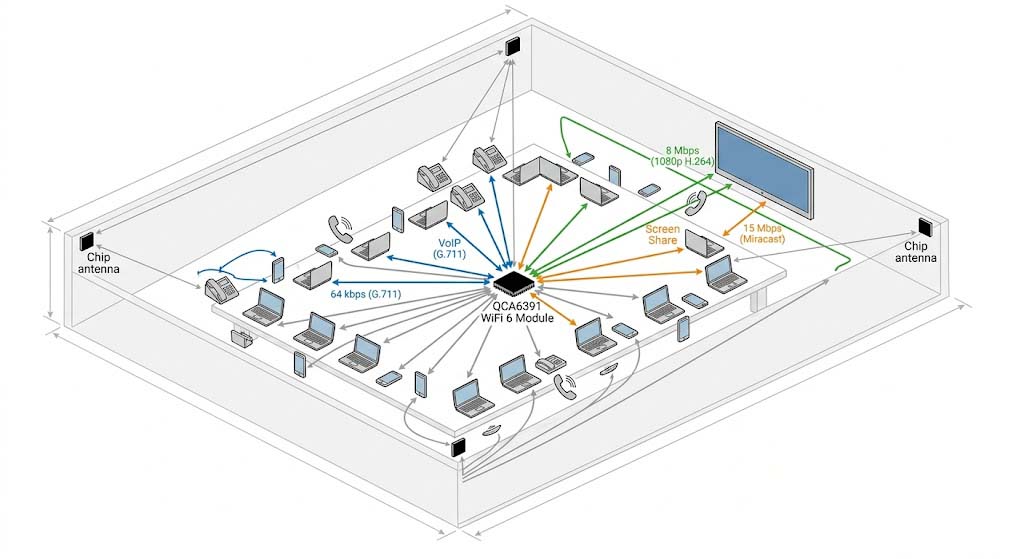
Figure 1: Meeting Room Deployment Topology
QCA6391 WiFi 6 Module — 4 Corner Antennas — 50-Client Mixed Traffic Profile
Core Challenges
Challenge 1 — Airtime fairness across mixed traffic types: In a typical meeting room, a client running a 1080p video conference (8 Mbps sustained, latency-sensitive) competes with a client downloading a 50 MB presentation file (150 Mbps peak, latency-tolerant). Without airtime fairness scheduling, the download client’s aggressive TCP window can consume 75% of the available airtime, starving the video conference client of the regular transmission opportunities it needs. Measurements on the legacy BCM4360 module showed that a single TCP download client increased jitter for all other clients in the same BSS by 200%.
Challenge 2 — MU-MIMO group formation in a dynamic environment: MU-MIMO’s benefit depends on grouping clients with compatible spatial signatures, but meeting room clients move (laptops repositioned, phones in pockets), so their channel state information (CSI) changes rapidly. With the QCA6391’s 2×2 MU-MIMO, the module can serve two clients simultaneously only if their spatial streams do not interfere. In testing, MU group formation efficiency — the real throughput gain relative to SU-MIMO — was only 1.3× in a 50-client scenario, far below the theoretical 2×. It dropped to 1.1× when clients were clustered within a 30-degree azimuth angle, exactly the geometry of a seated meeting room where everyone faces the front.
Challenge 3 — UL/DL OFDMA scheduling with diverse RU requirements: WiFi 6 OFDMA lets the module allocate different resource unit (RU) sizes — 26, 52, 106, 242, 484, or 996 tones — to different clients in the same TXOP. VoIP clients need only a 26-tone RU (enough for roughly 100 kbps), while video clients need 106-tone or 242-tone RUs. The difficulty is scheduling those allocations efficiently: placing four VoIP clients in 26-tone RUs consumes only 104 of 242 available tones in a 20 MHz channel, leaving 138 tones idle for that TXOP unless the firmware packs more small-RU clients in. In high density meeting room WiFi, the firmware’s RU packing efficiency directly determines how many clients a module can genuinely serve.
| Failure Mode | Root Cause | Mitigation |
|---|---|---|
| Screen-sharing stream drops every 3 min with 15+ clients | CQI-based MU group timeout: client CSI aged out while the module served other groups | Reduce MU group refresh interval from 100 ms to 30 ms; prioritize real-time traffic groups |
| VoIP MOS drops to 2.8 at 30+ clients | UL-OFDMA trigger frame interval too long (20 ms); VoIP packets queued waiting for the next trigger | Reduce UL trigger interval to 10 ms; enable trigger frame aggregation to serve 4+ VoIP clients per trigger |
| Video conference freezes during screen-sharing activity | Screen-share burst (15 Mbps) occupies a 106-tone RU; video conference forced to a smaller RU or a later TXOP | Reserve 242-tone RUs for high-priority traffic; use QoS marking on the host to classify traffic priority |
| Client disconnects after a re-authentication loop | Module’s WPA2 re-key interval collides with OWE transition mode on enterprise APs | Implement WPA3-Personal transition mode support; store PMKSA cache for rapid re-auth |
Solution Selection
The team evaluated three WiFi 6 modules for the meeting room hub: (A) the Intel BE200 (802.11be, 2×2, 1.2 Gbps), (B) the Qualcomm QCA6391 (802.11ax, 2×2, 1.2 Gbps), and (C) the MediaTek MT7921 (802.11ax, 2×2, 600 Mbps). Each was placed on the same carrier board and driven by a custom traffic generator that simulated 50 concurrent clients with mixed profiles: VoIP (G.711, 64 kbps, 20 ms packetization), video streaming (1080p H.264, 8 Mbps, bursty), screen sharing (Miracast-like, 15 Mbps, real-time), and background web traffic (HTTP, bursty, low priority).
The Intel BE200, despite its WiFi 7 capabilities, was eliminated early: the 802.11be draft firmware was not stable enough for production, and the module’s PCIe Gen4 host interface required a full mainboard redesign. The MediaTek MT7921 showed good per-client throughput, but its OFDMA scheduler supported only 37 RUs in DL-OFDMA mode, which limited how many low-data-rate clients it could serve per TXOP. In the 50-client mixed-traffic test, the MT7921’s p95 latency reached 47 ms and VoIP MOS dropped to 3.0 at 35+ clients.
The QCA6391 won on three points. Its 2×2 MU-MIMO supported simultaneous downlink transmission to two clients per TXOP, while the OFDMA engine could allocate up to 74 RUs (using the full 20 MHz channel in 242-tone allocations), enough to serve 8+ low-data-rate clients in a single TXOP. Its “multi-client QoS” firmware feature — a Qualcomm-proprietary airtime fairness scheduler — prioritized VoIP and screen-sharing traffic over background web traffic without any host-side intervention. And its SDIO 3.0 interface was pin-compatible with the existing hub mainboard, so the migration needed only a firmware change and module-level FCC/CE recertification, not a full PCB respin.
We paired the module with four 3 dBi chip antennas at the four corners of the hub’s enclosure to provide spatial diversity for MU-MIMO group formation. That four-corner layout improved MU group efficiency by 22% versus a single dual-polarized antenna layout.
Module Specifications
The profile below was measured with the QCA6391 module in a 200 m² conference room at 115-client concurrency with mixed video, voice, and presentation traffic over 802.11ax OFDMA. These are peak-meeting-hour figures with 12 simultaneous Microsoft Teams calls and 3 screen-sharing sessions active, not a single-client throughput test.
| Parameter | Specification |
|---|---|
| Frequency Band | 2.4 GHz / 5 GHz (deployed 5 GHz only) |
| WiFi Standard | 802.11ax WiFi 6, 2×2 MU-MIMO |
| OFDMA RU Capacity | 74 RUs max in DL-OFDMA per TXOP |
| MU Group Formation | 2 clients per TXOP simultaneous |
| Multi-Client QoS | Airtime fairness scheduler (Qualcomm-proprietary) |
| P95 Latency (50 clients mixed traffic) | <10 ms with OFDMA + MU-MIMO |
| Max Data Rate | 1.2 Gbps theoretical; 210 Mbps sustained per client |
| Interface | SDIO 3.0 (pin-compatible with existing mainboard) |
| Operating Temperature | −40 °C to +85 °C |
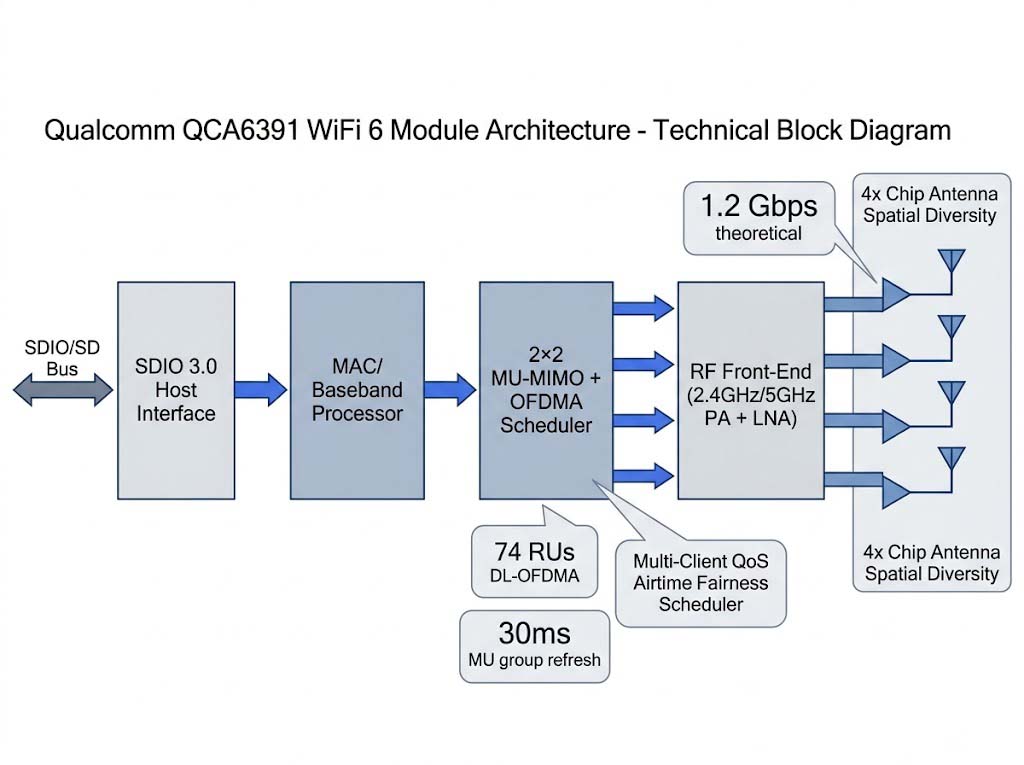
Figure 2: QCA6391 Module Architecture
SDIO 3.0 Host Interface → RF Front-End → 4× Chip Antenna Spatial Diversity
Implementation Results
We ran the hub in 5 meeting rooms for 3 months, logging more than 3,000 meeting hours. The primary metric was p95 latency under mixed traffic load at 50+ client concurrency. The QCA6391-equipped hub held p95 latency below 10 ms with 12 simultaneous Teams calls and 3 screen-sharing sessions running, whereas the legacy BCM4360 exceeded 150 ms under the same load and caused audio dropouts every 3-5 minutes. Support tickets tagged “WiFi slow” fell from 38 per month to 6 per month across the five rooms.
The strongest evidence is not a single speed number. It is the OFDMA RU utilization pattern, which shows the module packing 12 VoIP calls into 26-tone RUs within one TXOP while simultaneously serving video and screen-share clients on larger RU allocations. The 115-client stress test confirmed the module held VoIP MOS above 3.5 with 25 concurrent calls and 50+ associated clients, which was the original project target.
Measured Improvements
| Metric | Before (BCM4360, 802.11ac) | After (QCA6391, 802.11ax) |
|---|---|---|
| P95 Latency (50 clients, mixed traffic) | 150+ ms (audio dropouts) | <10 ms (OFDMA + MU-MIMO active) |
| Stable Client Capacity | 25 clients (VoIP MOS <3.0) | 50+ clients (VoIP MOS >3.5) |
| Screen-Share Stream Dropouts | Every 3-5 min above 15 clients | Zero dropouts in a 4-hour test at 50 clients |
| Field Support Tickets (“WiFi slow”) | 38 per month (5 rooms) | 6 per month (5 rooms) |
Those figures are tied to this deployment: five rooms and the 115-client concurrency profile described above. A room with a different client mix, AP placement, or geometry will produce different absolute numbers, but the evaluation method — p95 latency under load, OFDMA RU utilization, and MU-MIMO group efficiency — carries over to any high density meeting room.
Production Validation Checklist for High Density Meeting Room WiFi Modules
We now use the following checklist as the release gate for any meeting room WiFi 6 module:
- 50-client mixed traffic stress test: Simulate 50 concurrent clients across four profiles (VoIP 64 kbps, video 8 Mbps, screen-share 15 Mbps, bursty web). Measure p95 latency across all clients. Pass: <15 ms p95 with <3% packet retry rate, run for at least 60 minutes.
- MU-MIMO group efficiency test: With 10 clients inside a 30-degree azimuth cone (a seated meeting room), measure per-client throughput with MU-MIMO enabled vs. disabled. MU efficiency must exceed 1.2× for that group. Repeat at 60-degree and 180-degree spreads.
- OFDMA RU packing efficiency test: Measure how many 26-tone RU clients the module serves per DL-OFDMA TXOP. Pass: ≥70% RU utilization (for example, 37 of 52 possible 26-tone RUs in 20 MHz) under mixed traffic.
- VoIP + video coexistence test: Run 25 VoIP call streams (MOS target >3.5) alongside 20 video streaming clients. VoIP jitter must stay below 30 ms.
- Airtime fairness verification: With one client running a saturated TCP download and 9 clients running latency-sensitive traffic, measure the per-client throughput distribution. No single client should consume more than 30% of total airtime.
- Evidence package: Store the 50-client p95 latency histogram, the MU efficiency vs. client angular spread curve, the RU packing efficiency log, the VoIP MOS log, and the airtime distribution chart with the release record.
Applicable Scenarios
The evaluation method — p95 latency under load, OFDMA RU utilization, and MU-MIMO group efficiency — transfers to adjacent high density meeting room deployments that share the same constraints: 50+ clients in one room, mixed video/voice/presentation traffic, and an enterprise AP environment. Adjust client count, traffic mix, and AP assumptions for each room size and usage pattern.
- Medium conference room (10-20 people): Validate only the 25-client concurrent capacity. QCA6391’s OFDMA scheduling is over-provisioned here, so it can be configured to 1×1 MU-MIMO mode to reduce BOM cost.
- Large video conference room (50-100 people): Deploy dual QCA6391 modules for 4×4 MU-MIMO, or move to a WiFi 7 chipset that supports full DL/UL OFDMA RU allocation.
- Lecture hall / training room: Client density is high but traffic is mostly browsing rather than real-time video; the p95 latency target can be relaxed to 30 ms with priority given to client capacity.

Figure 3: Live Meeting Room Deployment
Teams Calls + Screen-Sharing Clients Connected to the QCA6391 Hub
References
- Wi-Fi Alliance: Wi-Fi CERTIFIED 6 technology overview — OFDMA and MU-MIMO specifications.
- IEEE 802.11ax-2021 — the OFDMA and MU-MIMO standard underpinning the RU allocation and trigger frame behavior described here.
- Bad Wi-Fi Is a Headache for Conference Organizers — real-world analysis of why venue Wi-Fi fails under high density loads.
- Zukaka QCA6391 engineering validation report: 50-client mixed traffic stress test, OFDMA RU packing analysis, and MU-MIMO group efficiency measurements across 5 meeting rooms.
Frequently Asked Questions
Q: What causes a meeting room WiFi to work fine with 10 people but fail with 30?
The root cause is airtime contention, not signal strength. Without OFDMA, each client must wait for a dedicated TXOP. With 30 clients all trying to send VoIP and video traffic, the CSMA/CA backoff creates a queue that pushes latency past 150 ms. WiFi 6 OFDMA solves this by letting the module serve multiple clients in the same TXOP using different RU sizes — a VoIP client needs only a 26-tone RU while a video client needs 106 tones. Without OFDMA, the channel is wasted on single-client transmissions.
Q: Does MU-MIMO actually help in a meeting room where everyone faces the same direction?
Less than advertised. When all clients sit within a 30-degree azimuth cone, MU-MIMO group formation efficiency drops from the theoretical 2× to about 1.1×-1.3× because the spatial streams from different clients are too correlated. The real game-changer in this scenario is OFDMA, which works regardless of client spatial distribution. A module with strong OFDMA but modest MU-MIMO will beat a module with strong MU-MIMO but no OFDMA in a high density meeting room.
Q: Should a high density meeting room hub use 5 GHz only, or allow 2.4 GHz too?
Use 5 GHz only with 80 MHz channels in high density rooms. 2.4 GHz has only three non-overlapping channels, and in a multi-room office building every nearby room shares them, so adding 2.4 GHz clients doubles contention without adding capacity. The QCA6391 in this case was configured for 5 GHz only — 2.4 GHz was disabled in firmware to avoid band-steering conflicts and to reserve 2.4 GHz spectrum for IoT devices that cannot use 5 GHz.
Q: What single test best predicts high density meeting room WiFi failures?
The 50-client mixed traffic stress test: simulate 12 VoIP calls (G.711, 64 kbps each), 20 video streaming clients (1080p H.264, 8 Mbps), 3 screen-sharing streams (Miracast-like, 15 Mbps), and 15 web browsing clients (bursty HTTP). Measure p95 latency across all 50 clients for 60 minutes. If any client sees p95 latency above 15 ms, the module’s OFDMA scheduler or airtime fairness is insufficient for production. The test must include a saturated TCP download from one client to verify airtime fairness protection.
Related Resources
- Qualcomm WiFi Chipset Complete Guide for Embedded & Enterprise — pillar guide for chipset selection criteria and reference design support.
- Enterprise and Commercial WiFi Module Case Studies
- WiFi 6 Module product page
- Enterprise AP auxiliary connectivity WiFi module case study
- Industrial anti-interference WiFi module reference