Industrial Wireless Solutions for Logistics & Warehouse
Blog 2026-07-14
Industrial Wireless Solutions for Logistics & Warehouse Operations
Key Overview
Target Audience: IT managers in logistics, warehouse operations managers, supply chain directors, smart warehousing solution providers
Core Question: What wireless solutions does the logistics and warehousing industry need? How to achieve real-time asset tracking? How to optimize warehouse network coverage?
Key Conclusion: Logistics and warehousing require highly reliable, high-density wireless networks. WiFi 6 is the preferred technology, combined with BLE for asset tracking, significantly improving warehouse efficiency.
Logistics & Warehouse Wireless Requirements
Modern logistics and warehouse operations rely heavily on wireless connectivity for real-time inventory management, asset tracking, and operational efficiency. The wireless network must support high device density, provide reliable coverage across large areas, and integrate with various IoT devices.
Key Requirements for Logistics Wireless
| Requirement | Description | Recommended Technology |
|---|---|---|
| High Device Density | Support 1000+ concurrent devices | WiFi 6 |
| Large Coverage Area | Warehouses up to 100,000 sq ft | WiFi 6 + Mesh |
| Real-Time Tracking | Sub-second location updates | Bluetooth 5 + WiFi |
| Low Latency | <10ms for critical operations | WiFi 6 |
| Reliability | 99.99% uptime | Redundant access points |
Wireless Technologies for Logistics
- WiFi 6 (802.11ax): High-density, high-performance connectivity
- Bluetooth 5: Asset tracking and beacon technology
- LoRaWAN: Long-range asset tracking
- UWB (Ultra-Wideband): Precise indoor positioning
Warehouse Network Design Best Practices
Network Architecture
- Distributed WiFi: Multiple access points strategically placed
- Mesh networking: Self-healing, redundant connectivity
- Network segmentation: Separate networks for different device types
- PoE infrastructure: Power over Ethernet for easy deployment
Access Point Placement
| Area Type | AP Density | Special Considerations |
|---|---|---|
| Open Warehouse | 1 AP per 5,000-8,000 sq ft | High ceilings, open line-of-sight |
| Narrow Aisles | 1 AP per 3,000-5,000 sq ft | Metal racking interference |
| Loading Docks | 1 AP per dock area | Weatherproof, outdoor coverage |
| Office/Admin | 1 AP per 2,000-3,000 sq ft | High user density |

Zukaka Solutions for Logistics
| Product | Key Features | Best For |
|---|---|---|
| 11ac 24V Gigabit Wireless Bridge PCBA | 500+ Mbps throughput, IP65 rated, -40°C to +65°C | High-density warehouse zones, indoor connectivity |
| 5GHz PTP/PTMP Wireless Bridge PCBA | 27 dBm EIRP, 3× RP-SMA antennas, RouterOS | Outdoor loading docks, warehouse-to-warehouse links |
| 11ac 48V Long-Range Bridge PCBA | 30km PTP range, 48V PoE, 23dBi antenna | Distribution center connectivity, cross-site links |
Real-Time Asset Tracking Solutions
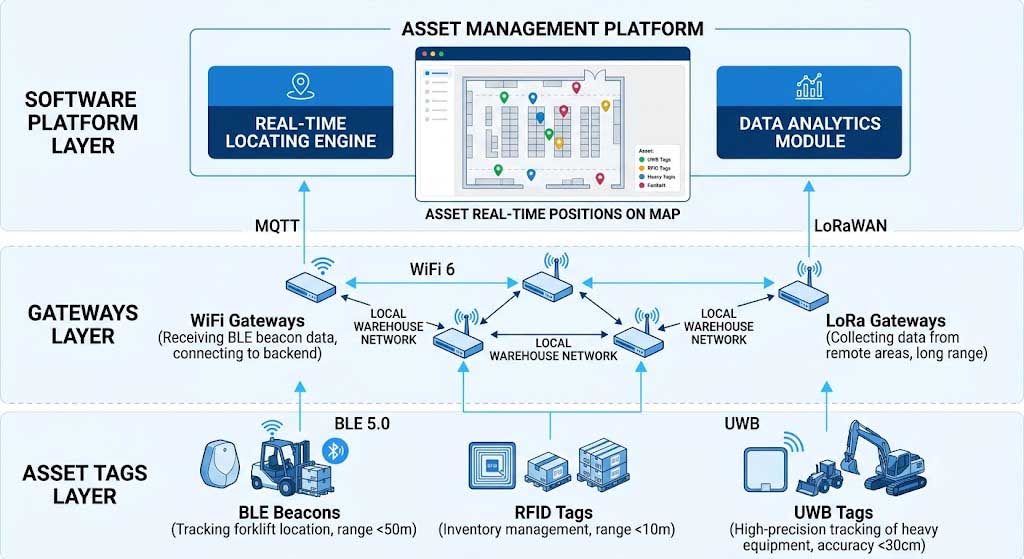
Asset Tracking Technologies
- Bluetooth Beacons: Low-cost, battery-powered tracking
- RFID: High-speed inventory scanning
- GPS: Outdoor asset tracking
- UWB: Precise indoor positioning (<30cm accuracy)
Tracking System Components
| Component | Description | Use Case |
|---|---|---|
| Tags/Beacons | Attached to assets for identification | Pallet tracking, equipment location |
| Gateways | Receive signals from tags | Coverage throughout warehouse |
| Software Platform | Central management and analytics | Real-time monitoring, reporting |
Wireless Inventory Management
Inventory Management Applications
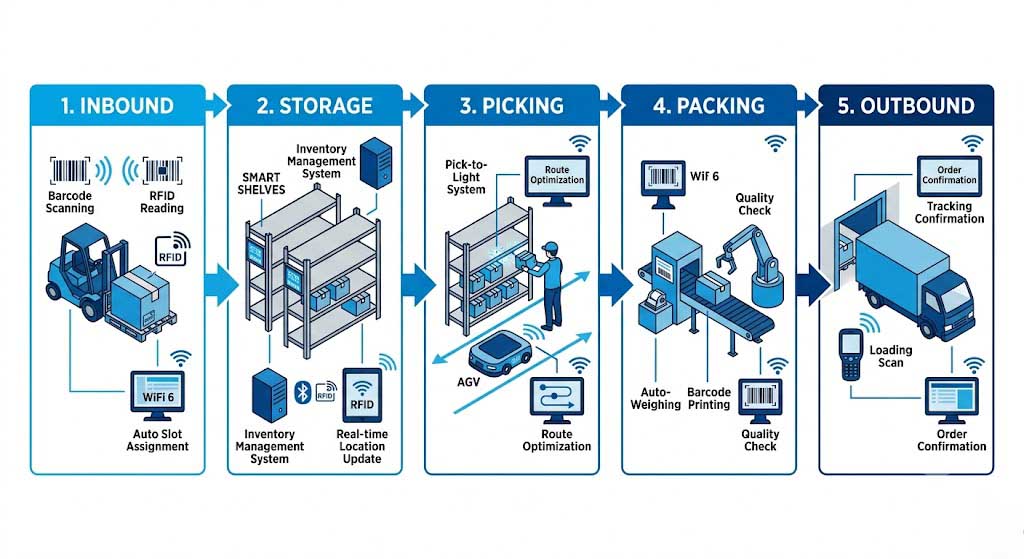
- Barcode scanners: Wireless scanning for fast inventory counts
- RFID readers: Bulk inventory scanning
- Smart shelves: Automated stock level monitoring
- Pick-to-light systems: Wireless guidance for order picking
Benefits of Wireless Inventory Management
- Real-time visibility: Always know stock levels
- Reduced errors: Automated processes minimize human error
- Faster operations: Streamlined picking and packing
- Better forecasting: Data-driven inventory planning
Frequently Asked Questions
Q: How many WiFi access points do I need for my warehouse?
The number of access points depends on warehouse size and layout. As a general guideline: open warehouses need 1 AP per 5,000-8,000 sq ft, while areas with metal racking may need 1 AP per 3,000-5,000 sq ft.
Q: What is the best wireless technology for asset tracking?
Bluetooth 5 is ideal for most indoor asset tracking applications due to its low power consumption and good range. For precise positioning (<30cm accuracy), UWB technology is recommended.
Q: Can WiFi 6 handle thousands of concurrent devices?
Yes, WiFi 6 is specifically designed for high-density environments. A single WiFi 6 access point can support 30+ concurrent clients with good performance, and a properly designed network can handle thousands of devices.
Q: How does wireless inventory management improve efficiency?
Wireless inventory management provides real-time visibility into stock levels, reduces manual counting errors, speeds up order picking with pick-to-light systems, and enables data-driven inventory forecasting.
Q: What security measures are needed for warehouse wireless networks?
Key security measures include WPA3-Enterprise encryption, network segmentation (separating IoT devices from corporate networks), regular firmware updates, and access controls based on device type.
Q: How do I handle interference from metal racking?
Metal racking can cause WiFi signal attenuation. Solutions include using dual-band WiFi, increasing AP density in racked areas, using directional antennas, and conducting a proper site survey before deployment.
By: Zukaka Engineering Team |
Last Updated: June 14, 2026 |
Connect on LinkedIn
⭐⭐⭐⭐⭐ OEM/ODM Partner
“Zukaka PCBA modules have been integral to our industrial wireless product line. The engineering team’s responsiveness and the modules’ reliability in harsh environments have made them our preferred supplier for three consecutive years.”
— VP of Engineering, Industrial Wireless Equipment Manufacturer
⭐⭐⭐⭐⭐ System Integrator
“We’ve integrated Zukaka wireless bridge PCBA into our smart city and industrial IoT deployments. The industrial temperature range and long-range capabilities have consistently exceeded our specifications.”
— Technical Director, Systems Integration Company
✔ Certifications: FCC, CE, RoHS compliant |
✔ Industrial temperature range -40 to +85 °C |
✔ IP65-rated for outdoor deployment
Contact our engineering team for customized PCBA solutions and technical support.