RapidFire Antenna Selection Quick Reference: Integrated 25dBi vs N-Type External — Pick Your Model in 30 Seconds
Key Overview
Who this is for: Campus IT ops, security integrators, ISP network engineers, and emergency comms project specifiers.
The core problem: YNWPTP RapidFire 6-25 (integrated 25dBi) and 6-N (N-Type external) share the exact same RF platform. Choosing the wrong antenna configuration wastes performance or leaves the link short of spec.
Key takeaway: 50km is the dividing line. Inside that range, go 6-25 — it saves time, money, and headaches. Beyond 50km, go 6-N with a 30dBi+ dish antenna for maximum range and antenna flexibility. Use the 7-scenario quick reference table below.
30-Second Decision Tree
Link distance < 50km?
├── Yes ──► Need 15–30 min out-of-box setup?
│           ├── Yes ──► YNWPTP 6-25 RapidFire ✅ (Integrated 25dBi)
│           └── No ──► Consider TCO weight: equipment + install + 5-year maintenance
│                       ├── Lowest 5-year TCO ──► YNWPTP 6-25
│                       └── May upgrade antenna later ──► Go 6-N (leave room)
└── No (50–80km+) ──► YNWPTP 6-N + 30dBi+ dish antenna ✅
Bottom line: 50km is the dividing line. Inside it, pick 6-25 (saves time, money, hassle). Beyond it, pick 6-N (maximum range + antenna flexibility).
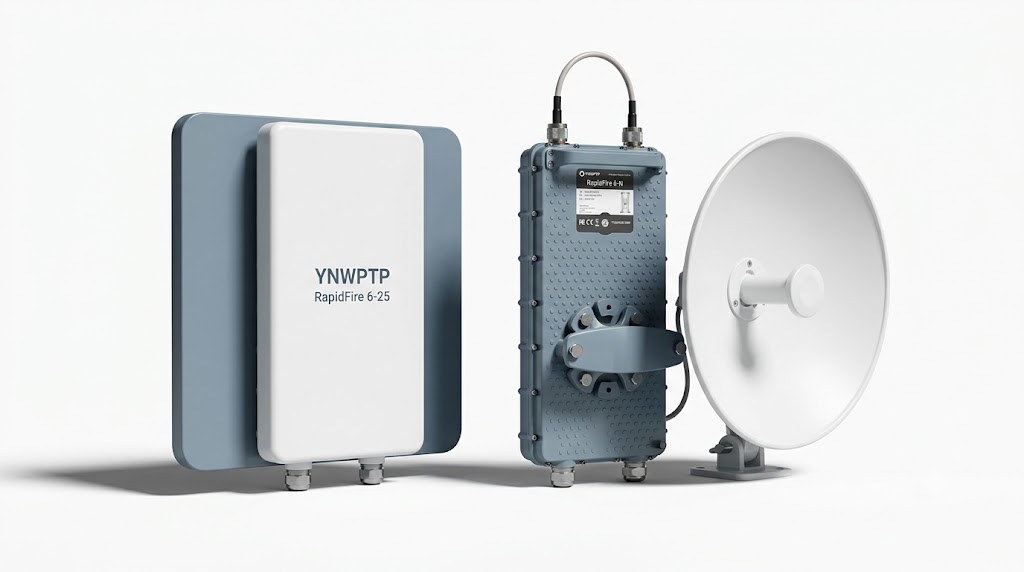
Core Differences at a Glance
| Dimension | YNWPTP 6-25 (Integrated) | YNWPTP 6-N (External) |
|---|---|---|
| Antenna Solution | Integrated 25dBi dual-polarized panel (fixed) | 2× N-Type female, compatible with 20–38dBi external antennas |
| Max Distance | 50 km+ (LOS) | 80 km+ (with 30dBi+ dish) |
| RF Loss | Zero (direct integration) | 0.5–1.5 dB (connector + cable) |
| Deployment Time | 15–30 min / end | 30–60 min / end |
| 5-Year TCO | Low (zero add-ons, zero maintenance) | Medium–High (antenna + cable + labor + maintenance) |
| Flexibility | Fixed antenna, not swappable | Supports different gain/beamwidth antennas |
| Ideal User | Campus IT, security integrators, emergency comms | ISP backhaul, tower engineers, multi-scenario projects |
RF platform is identical across both (W-Jet V protocol, 700Mbps @ 80MHz, IP67) — the only difference is antenna configuration. For a detailed technical comparison, see RapidFire 6-N vs 6-25 Full Comparison.
5 Common Selection Myths
Myth 1: External antennas always deliver higher gain
On links under 50km, the 6-25 actually outperforms a 6-N paired with a comparable 25dBi dish — zero cable loss means 3–8% higher measured UDP throughput. An external antenna only nets a real advantage when you go to 30dBi or higher, enough to overcome connector and cable losses.
Myth 2: A 6-N with a low-gain antenna saves money
The 6-N radio itself is slightly cheaper, but once you add the cost of the antenna, cables, connectors, and extra installation labor, you’re often above the all-in price of a 6-25. Real example: a 6-building campus project (5–15km links) using 6-25s got 5 pairs deployed in one day. With 6-N plus external antennas, the same job would take 3–4 days of labor.
Myth 3: Cable loss doesn’t matter much
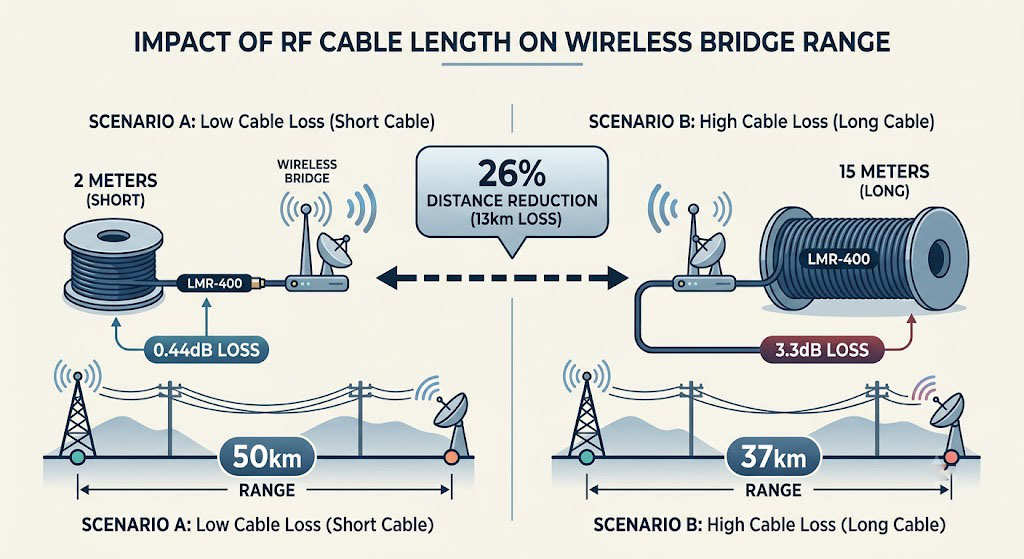
At 6GHz, 10m of low-loss cable introduces about 2.2dB of loss — that effectively cuts the usable range by roughly 26% on a 30km link. Keep RF cables under 10m; if you need 15m+, step up to a thicker low-loss cable type.
Myth 4: 6-25 doesn’t work for emergency scenarios
Quite the opposite — 15-minute single-person deployment per end, PoE power over a single Ethernet cable, zero RF tools required. The 6-25 is actually the ideal choice for emergency comms.
Myth 5: You can switch a 6-N back to an integrated antenna later
No. The 6-N only has N-Type connectors — there’s no way to convert it to an integrated antenna. And the 6-25 can’t accept external antennas. Your choice is one-time, so lock in your link requirements before you buy.
Scenario Quick Reference Table
| Typical Scenario | Recommended Model | Core Reasoning |
|---|---|---|
| Industrial park multi-building interconnect (5–20km) | 6-25 | When deploying multiple link pairs in parallel, 6-25 saves 1–2 hours per pair on installation (no antenna assembly, no cable routing). 5-pair comparison: 6-25 done in one day, 6-N takes 3–4 days. |
| ISP backbone link (50–80km+) | 6-N + 30dBi+ | 25dBi gain doesn’t leave enough link margin beyond 50km. At 50km the 6-25 has about 9dB margin; subtract rain fade and you’re down to 2–3dB of headroom. At 80km the margin goes negative. A 6-N + 30dBi dish pulls it back to 15dB+ of safe margin. |
| Video surveillance backhaul (5–30km) | 6-25 | Zero cable loss means better signal integrity. Surveillance traffic is uplink-heavy, and the 6-25’s 700Mbps symmetric throughput handles 50–100 1080p cameras with room to spare. |
| Emergency / temporary events | 6-25 | Out-of-box to link up in 30 minutes or less (vs 90 minutes for 6-N). One person can do it. No RF background needed — the 2.4GHz management radio and phone RSSI reading are all you need for alignment. |
| Seaside / port / ship-to-shore | 6-N | Radio unit stays indoors in a cabinet, away from salt spray. The antenna can be a corrosion-resistant model. The 6-25 sits fully outdoors; IP67 handles rain but salt fog on N-connector seals is a long-term concern. |
| Tower-top maintenance, multi-site management | 6-N | RF unit (2.9kg) lives in a protected enclosure. Antenna mounts independently. Maintenance means handling the RF unit only — no need to touch antenna alignment. With the 6-25, any maintenance means handling the whole unit and potentially breaking a calibrated antenna alignment. |
| Rural broadband backhaul (30–50km) | Either, budget-dependent | 30–40km: go 6-25 (lower TCO). 45–50km: go 6-N + 30dBi (safer margin). If there’s a chance you’ll scale to 50km+ later, start with 6-N so you don’t need a full hardware swap. |
5-Year TCO Quick Estimate
| Cost Item | 6-25 (One Pair) | 6-N + 30dBi+ Cable (One Pair) |
|---|---|---|
| Hardware | Antenna included | Radio ~$50 less, but antenna + cable + connectors ~$200 |
| Installation Labor | 1 hr × 2 ends = 2 hrs | 1.5 hrs × 2 ends = 3 hrs |
| 5-Year Maintenance | None | Cable replacement at year 3–5, ~$100 |
| 5-Year TCO Delta | Baseline | +$350–550 |
If your link is ≤50km with no special antenna requirements, the 6-25 wins on TCO hands-down. IHS Markit Industrial Wireless Survey 2024 notes that deployment labor accounts for 25–40% of TCO — the 6-25’s 50%+ reduction in install time makes a real dent in total cost.
Cross-Links
- Full technical comparison → RapidFire 6-N vs 6-25 Full Comparison
- Protocol-layer performance → W-Jet V Protocol & iPoll 3 Performance Deep Dive
- Complete selection framework → The Complete Guide to Industrial Wireless Bridges
Performance Disclaimer: Link budget, throughput, and range data in this article are based on theoretical calculations and lab test conditions. Real-world performance varies with antenna configuration, installation height, weather, and RF interference.
Certifications: YNWMICRO wireless bridge series is certified under FCC (47 CFR Part 15), CE (EN 301 893), SRRC, and other international standards. Contact your sales representative for certification copies.