Industrial Wireless Bridge Band Selection Guide: 6GHz vs 5GHz Deep Dive (600MHz Spectrum Advantage)
Key Overview
Who this is for: Industrial wireless network planning engineers, IT infrastructure managers, WISP operators, and decision-makers for campus and factory network projects.
Core Issue: How to choose between 5GHz and 6GHz for industrial wireless bridge deployments — pick wrong and you face link instability, throughput shortfalls, or runaway project costs.
Key Conclusions: 6GHz beats 5GHz hands-down on spectrum cleanliness — 10-15dB lower noise floor, 30+ non-overlapping channels, zero DFS constraints. Link availability jumps from 99.0% on 5GHz to 99.9%+. But 5GHz still holds real advantages in WiFi 6 maturity (1.5Gbps throughput) and hardware cost (10-30% cheaper). There’s no “best” band — only the best band for your use case. A mixed architecture (6GHz backbone + 5GHz access) often delivers the best balance in large projects.
1. Frequency Band Basics
Band Allocation by Region
Different countries and regions have different rules for 5GHz and 6GHz. Here’s a typical breakdown for China and most Asia-Pacific markets:
| Band | Frequency Range | Available 80MHz Channels | DFS Required? | Typical Use |
|---|---|---|---|---|
| 5GHz Low | 5.150-5.250 GHz | 1-2 | No (some countries require) | Indoor WiFi, industrial bridges |
| 5GHz Mid | 5.250-5.350 GHz | 1-2 | Yes (radar detection) | Outdoor WiFi, industrial bridges |
| 5GHz High | 5.470-5.850 GHz | 3-5 | Yes (weather/military radar) | Outdoor WiFi, industrial bridges, ISM |
| 6GHz | 5.850-6.450 GHz | 6-7 | No (most countries) | Industrial wireless bridges, fixed satellite |
Radio Propagation Characteristics
The propagation difference between 5GHz and 6GHz is under 2dB. On a line-of-sight link at the same distance, path loss is nearly identical. The real differentiator is the spectrum environment.
| Propagation Factor | 5GHz | 6GHz | What It Means |
|---|---|---|---|
| Free-space path loss | Baseline | ~1.5-2dB higher | 6GHz has slightly more attenuation at the same distance |
| Penetration loss (walls/trees) | Baseline | ~10-20% higher | 6GHz penetrates slightly less |
| Diffraction (bending around obstacles) | Baseline | Slightly weaker | 6GHz is more sensitive to obstructions |
| Rain fade | Baseline | 2-3× higher (heavy rain) | 6GHz suffers more attenuation in heavy rain |
| Atmospheric absorption (oxygen) | Baseline | Slightly higher | Difference is minor, usually negligible |
Bottom line: The physical difference between 5GHz and 6GHz is small. On a line-of-sight link at the same distance, path loss differs by less than 2dB. The real factor in your decision is the spectrum environment, not propagation physics.
2. What Makes 6GHz Special
Low Interference — The #1 Advantage
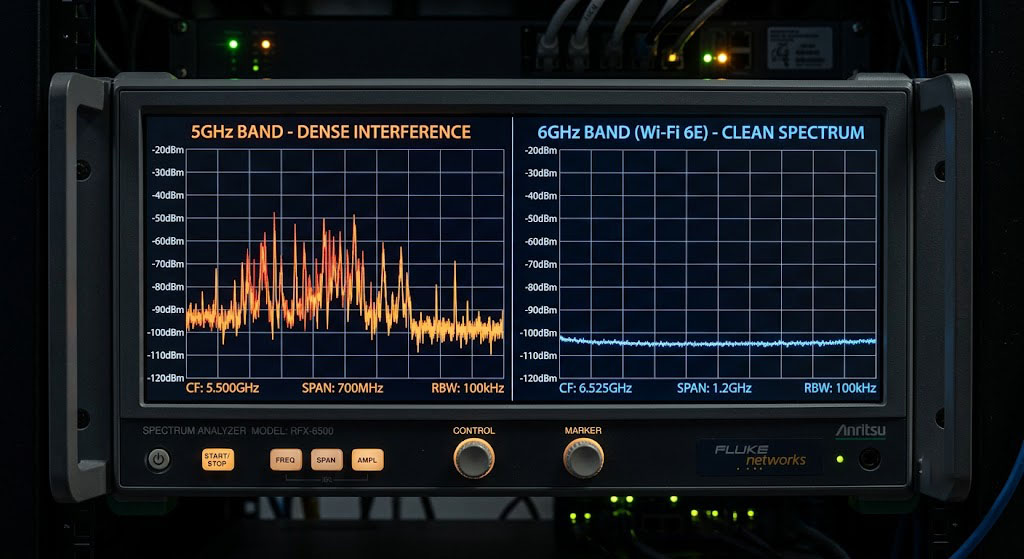
The biggest thing 6GHz has going for it is less interference. This band has a “clean history” — for years it was used mainly by fixed satellite services and a few radio定位 operations. Nothing like the dense mix of WiFi, radar, and ISM devices crowding 5GHz.
Interference Comparison (Typical Urban Environment)
| Metric | 5GHz Band | 6GHz Band |
|---|---|---|
| Average noise floor | -90 to -100 dBm | -100 to -110 dBm |
| Noise floor fluctuation | ±5-10 dB (affected by WiFi traffic) | ±2-3 dB (stable) |
| Usable interference-free 80MHz channels | 0-3 (urban) / 3-5 (suburban) | 5-7 (all areas) |
| DFS interruption probability | Medium-High (up to several times/month in radar-dense areas) | None |
| Co-channel interference management complexity | High (requires careful channel & power planning) | Low (plenty of channels available) |
What a 10dB noise floor drop means: In link budget terms, 10dB lower noise gives you 10dB higher SNR at the same received signal strength. That translates to 3-4 MCS level gains (e.g., 64-QAM up to 256-QAM) and roughly 50-100% more throughput at the same distance — or significantly longer reach at the same throughput.
Plentiful Channel Resources
With 600MHz of usable spectrum (5.850-6.450GHz), 6GHz gives you room to plan:
- 7 non-overlapping 80MHz channels — a single base station can run up to 7 sectors without any channel reuse
- 3 non-overlapping 160MHz channels — plenty of room for 802.11ax ultra-wide channel operation
Compare with 5GHz: in ideal conditions (no DFS restrictions) you get about 5-6 non-overlapping 80MHz channels, but in practice DFS limits can cut that by 30-50%.
No DFS Constraints
DFS (Dynamic Frequency Selection) on 5GHz has been a pain point for years. When a 5GHz device detects radar on 5.250-5.350GHz or 5.470-5.725GHz, it must switch channels — causing 30-60 seconds of service disruption.
Areas most affected:
- Coastal zones: heavy maritime radar activity
- Airport vicinities: airport weather radar
- Military base areas: military radar
- Near weather stations: weather radar
In most countries, 6GHz has no DFS requirement. That means full control over channel selection, zero radar-triggered outages, and much simpler planning and maintenance.
3. Where 5GHz Still Shines
WiFi 6 Maturity
Right now, most WiFi 6 (802.11ax) gear lives on 5GHz. 5GHz WiFi 6 delivers 1.5Gbps throughput, 160MHz channel width, and 1024-QAM. 6GHz also supports 802.11ax (WiFi 6E), but industrial-grade 6GHz WiFi 6 products are less mature and less widely available than their 5GHz counterparts.
Ecosystem and Compatibility
5GHz has a nearly 20-year head start. The ecosystem is massive:
- Every standard WiFi client (phones, tablets, laptops) supports 5GHz
- A huge range of industrial wireless bridges and APs cover 5GHz
- Backward compatibility with older YNW equipment (5GHz series)
Cost Advantage
5GHz RF components benefit from a more mature supply chain and higher volumes. Industrial bridges on 5GHz typically cost 10-30% less than equivalent 6GHz gear. For cost-sensitive projects, this matters.
Slightly Lower Free-Space Path Loss
Theoretically, 5GHz has about 1.5-2dB less path loss than 6GHz at the same distance. It’s not much, but at extreme ranges those 2dB can be the difference between a working link and no link at all.
4. Scenario-Based Selection Guide
Decision Matrix
| Use Case | Recommended Band | Top Pick | Why |
|---|---|---|---|
| Ultra-long-distance backbone (50km+) | 6GHz | RapidFire 6-N/6-25 | Low interference ensures link stability |
| Gigabit high-speed access (1.5Gbps) | 5GHz | YNW 5-23ax / 5-20ax | WiFi 6 supports 160MHz channels |
| High-density PtMP (10+ nodes) | 6GHz | YNW 6-90ac + 6-20ac | Plenty of channels, no reuse interference |
| WISP rural broadband | 5GHz | YNWBASE 5-90 + YNWSU 5-20/23 | Mature ecosystem, low cost |
| Safe-city surveillance backhaul | 6GHz | YNW 6-20ac | Low interference for stable video transport |
| Industrial automation data collection | 5GHz | YNW 5ax series | 1.5Gbps headroom for future expansion |
| Factory with complex RF environment | 6GHz | RapidFire / YNW 6ac | Avoids 5GHz interference from factory equipment |
| Extreme range (100km+) | 6GHz | RapidFire 6-N + high-gain antenna | Only viable band option |
| Budget-first projects | 5GHz | YNWBASE / YNWSU | Lower equipment and accessory costs |
| Integration with existing WiFi clients | 5GHz | YNW 5ax series | Compatible with standard 5GHz WiFi devices |
Hybrid Architecture Strategy
In many large-scale deployments, the best answer isn’t one band — it’s both:
               [Core Layer]                   [Access Layer]
              6GHz Backbone                  5GHz Access Network
           ┌────────────────────┐     ┌─────────────────────┐
           │  RapidFire 6-N    │────│  YNW 5-90ax (BS)     │ ← WiFi6 sector
           │  (1-300km, trunk)  │     │                      │
           └────────────────────┘     └─────────────────────┘
                      │                          │
                      │                          ├── YNW 5-23ax (CPE 1)
                      │                          ├── YNW 5-20ax (CPE 2)
                      │                          └── WiFi clients (phone/laptop)
                      │
           ┌────────────────────┐     ┌─────────────────────┐
           │  YNW 6-20ac   │────│  YNW 6-90ac     │ ← 6GHz PtMP
           │  (relay/access)     │     │  (sector base)        │
           └────────────────────┘     └─────────────────────┘
                      │                          │
                      │                          ├── YNW 6-15ac (CPE 1)
                      │                          ├── YNW 6-20ac (CPE 2)
                      │                          └── YNW 6-15ac (CPE 3)
This design plays to each band’s strengths:
- 6GHz clean spectrum for stable, high-capacity backbone links
- 5GHz WiFi 6 for gigabit-class access speeds
- 5GHz compatibility keeps client device costs and deployment complexity low
5. Real-World Link Performance Comparison
Same Deployment Conditions (10km Line of Sight)
Test setup: 10km LOS, both sides using 25dBi antennas, 30dBm TX power:
| Parameter | 5GHz System | 6GHz System (RapidFire) |
|---|---|---|
| Free-space path loss | 146.4 dB | 148.0 dB |
| Received signal strength | -56.4 dBm | -58.0 dBm |
| Typical noise floor | -98 dBm | -108 dBm |
| SNR | 41.6 dB | 50.0 dB |
| Max usable modulation | 256-QAM 5/6 | 256-QAM 5/6 (both well above threshold) |
| Peak throughput (80MHz) | 866 Mbps | 866 Mbps |
| Stability | Medium (affected by 5GHz WiFi/radar interference) | High (minimal interference on 6GHz) |
| Long-term availability | 99.0-99.5% | 99.5-99.9% |
Key finding: At short range (<10km), both bands deliver similar peak throughput. 6GHz's real edge is stability and availability.
Long-Distance Deployment (60km Line of Sight)
Test setup: 60km LOS, both sides using 1.2m parabolic dish antennas (35dBi), 30dBm TX power:
| Parameter | 5GHz System (if available) | 6GHz System (RapidFire 6-N) |
|---|---|---|
| Free-space path loss | 161.9 dB | 163.5 dB |
| Received signal strength | -57.9 dBm | -59.5 dBm |
| Typical noise floor | -95 dBm | -105 dBm |
| SNR | 37.1 dB | 45.5 dB |
| Max usable modulation | 256-QAM (good) | 256-QAM (excellent) |
| Throughput (80MHz) | 780 Mbps | 780 Mbps |
| DFS risk | High (60km may cross radar zones) | None |
| Overall availability estimate | 97-99% (DFS + interference) | 99.5-99.9% |
Key finding: At long range, 6GHz’s link margin and stability advantages become much more pronounced.
6. How Band Choice Affects System Design
Channel Planning
| Planning Factor | 5GHz | 6GHz |
|---|---|---|
| Available 80MHz channels | 2-5 (affected by DFS) | 6-7 (no DFS) |
| Channel planning complexity | High (must track radar activity logs) | Low (simple assignment works) |
| Sector base station channel scheme | Reuse needed after 2-3 sectors | Reuse not needed until 6-7 sectors |
| Channel change impact | DFS may cause service interruption | None |
Interference Mitigation Design
| Design Consideration | 5GHz | 6GHz |
|---|---|---|
| Spectrum analysis frequency | Quarterly, or whenever link quality drops | Semi-annual or during annual maintenance |
| Auto channel switching | Recommended (more interference) | Optional (less interference) |
| Co-site interference management | Needs fine-grained power control and channel isolation | Natural isolation from abundant channels |
| External interference source identification | Needs professional spectrum analyzer | Built-in spectrum analyzer usually sufficient |
Operations & Maintenance Cost
| O&M Item | 5GHz Annual Cost (Est.) | 6GHz Annual Cost (Est.) |
|---|---|---|
| Interference troubleshooting | 2-4 sessions × 4-8 hours | 0-1 sessions × 2-4 hours |
| DFS outage handling | May involve 1-2 incidents × 1-2 hours | 0 |
| Channel re-planning | Possibly 1 session × 2-4 hours | Rarely needed |
| Total annual O&M hours | 10-40 hours | 2-8 hours |
7. Future Trends
WiFi 6E and WiFi 7 on the Horizon
As WiFi 6E (6GHz WiFi) and WiFi 7 (802.11be) mature, the 6GHz ecosystem will grow fast:
- WiFi 6 on 6GHz will push past 1.5Gbps throughput
- WiFi 7’s 320MHz channel bandwidth is much easier to deploy on 6GHz (needs contiguous 320MHz spectrum)
- More client devices will ship with native 6GHz support
Spectrum Regulation Trends
Multiple countries are progressively opening the 6GHz band for unlicensed use, which will further lower the barrier for 6GHz equipment deployment.
Long-Term Selection Strategy
Over the long term, 6GHz will play a bigger and bigger role in industrial wireless. But in the near term (next 2-3 years), 5GHz remains the most cost-effective and ecosystem-mature choice. When planning large-scale projects:
- Start with 6GHz on the backbone — leave room for future capacity demands
- Consider 5GHz for the access layer — leverage its mature ecosystem and lower cost
- Check band flexibility when purchasing — choose equipment that supports multiple bands or variable channel widths
8. Summary
Choosing between 5GHz and 6GHz comes down to matching the band to your specific deployment needs:
Go with 6GHz when:
- Link distance exceeds 50km
- RF environment is complex with lots of interferers
- You need high-density PtMP (10+ nodes per sector)
- Your site is in a radar-active zone (coastal, airport, military area)
- You need extreme link availability (99.9%+)
Go with 5GHz when:
- You need 1.5Gbps gigabit-class throughput (WiFi 6 is more mature on 5GHz today)
- You need to connect with a large base of standard 5GHz WiFi clients
- Budget is tight and you want the best bang for the buck
- Link distance is under 10km with a clean RF environment
- You need backward compatibility with legacy YNW n/ac equipment
Hybrid deployment: For large projects where conditions allow, a 6GHz backbone + 5GHz access hybrid often delivers the best of both worlds — performance and cost in balance.
The best band isn’t “which one is better” — it’s “which one is better for your scenario.” Get that right, and you’ll be well equipped to make smart choices across YNWMICRO’s full lineup of 5GHz and 6GHz products.
*This article is written based on the YNWMICRO product line. Country-specific band regulations may change. Always verify the latest frequency usage policies with your local radio regulatory authority before deployment.*
9. Case Study: Band Migration at a South China Electronics Factory
Project Snapshot:
- Date: November 2024
- Location: Songshan Lake High-Tech Zone, Dongguan, Guangdong
- Challenge: Existing 5GHz links saw noise floor rise to -87dBm due to a new campus WiFi deployment — performance degraded severely
- Solution: Migrated to 3x YNWPTP 6-N links operating on the 6GHz band
- Results: Noise floor dropped to -103dBm, per-link throughput recovered from 320Mbps to 580Mbps, zero outages
- Source: Factory IT department acceptance report
Frequently Asked Questions (FAQ)
Q: What’s the core difference between 6GHz and 5GHz for industrial wireless bridges?
The core difference comes down to spectrum environment and available channels. 6GHz (5.850-6.450GHz) offers roughly 600MHz of continuous unlicensed spectrum — you can plan 6-7 non-overlapping 80MHz channels with an average noise floor of -100 to -110dBm (10-15dB lower than 5GHz), and zero DFS disruption. 5GHz (5.150-5.850GHz) gives you only 2-5 usable 80MHz channels, is heavily restricted by DFS, sees over 60% channel occupancy in urban areas, and has a noise floor of -90 to -100dBm. On propagation physics, the two bands differ by less than 2dB (FSPL). The real performance gap is driven by the spectrum environment, not propagation.
Q: When should I choose the 6GHz band?
6GHz is the clear winner for: ultra-long-distance backbone links over 50km; complex RF environments like industrial plants with lots of interferers; high-density PtMP deployments (10+ nodes per sector); sites near radar-active areas (coastal zones, airports, military bases); and applications demanding extreme link availability (99.9%+). In these scenarios, 6GHz’s low-interference profile pushes link availability from 99.0-99.5% (5GHz) to 99.5-99.9%, and its abundant channel resources dramatically simplify planning.
Q: When should I choose the 5GHz band?
5GHz is still the better choice for: applications needing 1.5Gbps gigabit-class throughput (WiFi 6 is more mature on 5GHz today, the YNW 5ax series delivers); integration with a large base of standard 5GHz WiFi clients; budget-constrained projects — 5GHz equipment typically costs 10-30% less than 6GHz; links under 10km where the RF environment is clean; and backward compatibility with legacy YNW (5GHz series) equipment. Also, 5GHz WiFi 6 (802.11ax) is a mature technology that supports 160MHz channels and 1024-QAM modulation.
Q: What’s the advantage of a hybrid approach (6GHz backbone + 5GHz access)?
A hybrid architecture plays to each band’s strengths: 6GHz’s clean spectrum delivers stable, high-capacity backbone links, while 5GHz’s WiFi 6 technology provides gigabit-class access speeds and broad client device compatibility. A typical setup uses 6GHz (RapidFire 6-N or YNW 6-20ac) for PtP/PtMP long-distance backhaul, and 5GHz at the access layer (YNW 5-90ax sector base + YNW 5-23ax CPEs) for last-mile coverage. This design achieves the best performance-to-cost balance in large campus, WISP rural broadband, and similar deployments.