Home vs Enterprise Wireless AP: Hardware Design Differences
Blog 2026-06-01
Home vs Enterprise Wireless AP: Hardware Design Differences
Key Overview
Who this article is for: Network engineers, IT managers, procurement specialists, and product managers evaluating wireless AP solutions.
Core Issue: Understanding the hardware design differences between home and enterprise wireless APs to make informed purchasing decisions.
Key Conclusions: Home APs prioritize cost and simplicity, while enterprise APs emphasize performance, reliability, and manageability. The hardware differences reflect these distinct use cases and requirements.
Home and enterprise wireless APs may look similar on the surface, but they are designed for fundamentally different use cases. Home APs prioritize cost, ease of use, and compact form factor, while enterprise APs focus on performance, reliability, security, and manageability. Understanding these hardware design differences is essential for selecting the right solution. As a core component of how to balance RF performance and cost in wireless AP motherboard development, these design choices reflect the target market requirements. What are the key hardware differences? How do they impact performance? Which solution is right for your needs? This article provides comprehensive guidance.
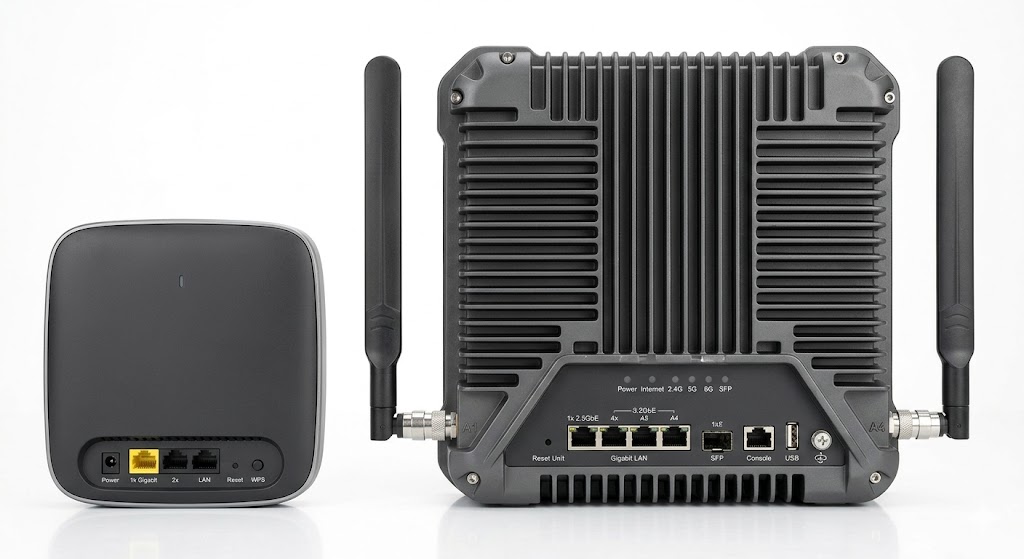
Introduction: Different Requirements, Different Designs
The key differences in requirements:
- Home APs: Single-user, small coverage area, cost-sensitive, simple setup
- Enterprise APs: Multi-user, large coverage area, high reliability, advanced security
These requirements drive fundamental hardware design differences in every aspect of the product.
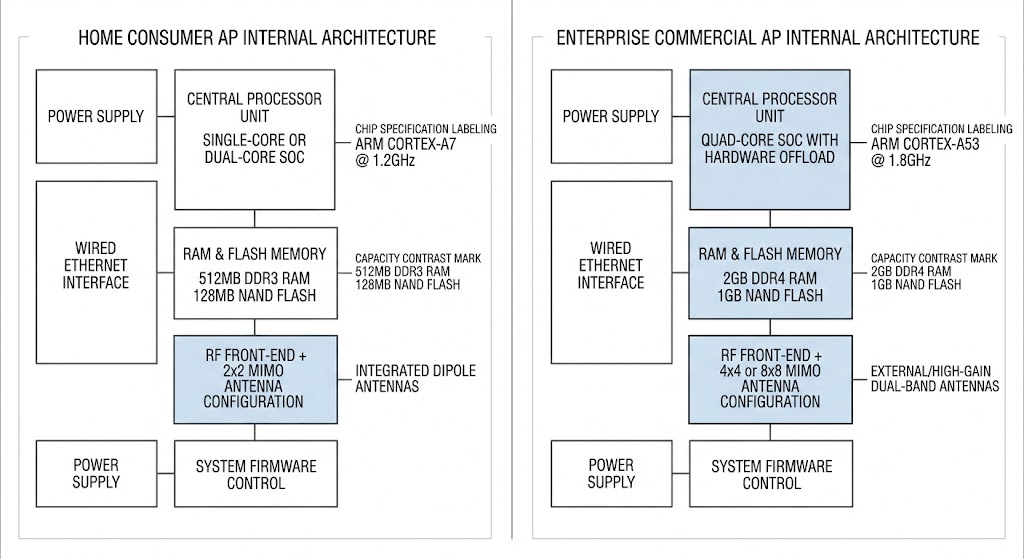
Core Architecture Differences
Core architecture differences:
| Feature | Home AP | Enterprise AP |
|---|---|---|
| SoC Architecture | Single-core or dual-core | Multi-core, often with dedicated processors |
| MIMO Support | 2×2 MIMO typical | 4×4 or 8×8 MIMO |
| Spatial Streams | 2 streams | 4+ streams |
| Concurrent Users | 10-20 users | 50-200+ users |
| Throughput | Up to 3 Gbps | Up to 10+ Gbps |
RF Performance and Antenna Design
RF performance differences:
| Feature | Home AP | Enterprise AP |
|---|---|---|
| Transmit Power | 18-20 dBm | 23-26 dBm |
| Receive Sensitivity | -70 to -75 dBm | -75 to -85 dBm |
| Antenna Type | Internal PCB/chip antennas | External high-gain antennas |
| Antenna Gain | 2-4 dBi | 5-12 dBi |
| Beamforming | Basic or none | Advanced beamforming (MU-MIMO) |
| Band Support | 2.4GHz + 5GHz | 2.4GHz + 5GHz + 6GHz (Wi-Fi 6E) |
Processing Power and Memory
Processing and memory differences:
| Feature | Home AP | Enterprise AP |
|---|---|---|
| CPU | Single-core @ 500MHz-1GHz | Multi-core @ 1GHz+ |
| DRAM | 256MB-512MB | 1GB-4GB |
| Flash | 128MB-256MB | 512MB-2GB |
| Offloading | Minimal | Hardware acceleration for security, QoS |
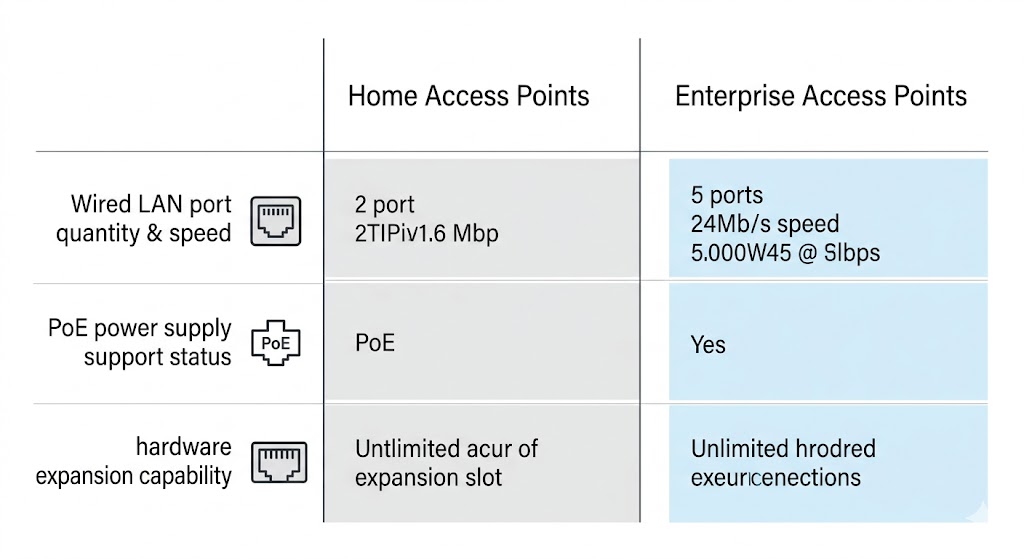
Connectivity and Expansion Options
Connectivity differences:
| Feature | Home AP | Enterprise AP |
|---|---|---|
| Ethernet Ports | 1-2 Gigabit ports | 2-4 Gigabit or 10G ports |
| PoE Support | Passive PoE or none | 802.3af/at/bt PoE |
| Expansion Slots | None | USB, mini-PCIe, SFP+ |
| Uplink Options | Single Ethernet | Dual uplink, link aggregation |
| Mesh Support | Consumer mesh protocols | Enterprise mesh, roaming protocols |
Reliability and Durability
Reliability differences:
| Feature | Home AP | Enterprise AP |
|---|---|---|
| Mean Time Between Failures (MTBF) | 30,000-50,000 hours | 100,000+ hours |
| Operating Temperature | 0-40°C | -40 to 70°C |
| Redundancy | None | Redundant power, dual uplink |
| Fanless | Typically yes | Some have fans for high-power models |
| Certifications | Basic FCC/CE | FCC/CE, ISO, military standards |
Management and Security Features
Management and security differences:
| Feature | Home AP | Enterprise AP |
|---|---|---|
| Management Interface | Web UI, mobile app | Web UI, CLI, cloud management |
| Central Management | None or basic | Controller-based management |
| Security Protocols | WPA2/WPA3 | WPA3-Enterprise, 802.1X |
| Guest Access | Basic | Advanced guest portals, captive portal |
| QoS | Basic traffic prioritization | Advanced QoS, traffic shaping |
| Analytics | Minimal | Comprehensive network analytics |
Power Requirements
Power requirements differences:
| Feature | Home AP | Enterprise AP |
|---|---|---|
| Power Consumption | 5-15W | 15-60W |
| Power Supply | External AC adapter | PoE or external PS |
| PoE Support | Optional | 802.3af/at/bt |
| Power Redundancy | None | Optional dual power supplies |
Cost Considerations
Cost differences:
| Cost Type | Home AP | Enterprise AP |
|---|---|---|
| Unit Cost | $50-$200 | $200-$1,500+ |
| Management Software | Included or free | Subscription-based |
| Support Contract | Optional | Recommended |
| Lifecycle Cost | Lower upfront, shorter lifespan | Higher upfront, longer lifespan |
Summary: Choosing the Right AP
Key considerations when choosing:
- Number of Users: Home APs handle 10-20 users; enterprise APs handle 50+ users
- Coverage Area: Home APs cover small areas; enterprise APs cover large areas with better range
- Performance Needs: Home APs offer basic performance; enterprise APs deliver high throughput and advanced features
- Management Requirements: Home APs are simple to manage; enterprise APs require central management
- Budget: Home APs are cost-effective; enterprise APs require larger upfront investment
As a core component of how to balance RF performance and cost in wireless AP motherboard development, understanding these differences helps in making informed product design and purchasing decisions.
For teams deciding how to bring their AP product to market, the choice between OEM vs ODM for wireless AP motherboards plays a major role in determining customization level, development cost, and time to market.
References
Frequently Asked Questions
Q: Can I use a home AP in a small business environment?
You can, but it may not be ideal. Home APs lack the performance, reliability, and management features needed for business environments. For small businesses with 10-20 users, consider a SOHO (Small Office/Home Office) AP which offers a balance between home and enterprise features.
Q: Why are enterprise APs so much more expensive?
Enterprise APs include premium components for better RF performance, more processing power, advanced security features, and are built for 24/7 reliability. They also include support and management software that adds value for organizations.
Q: Do enterprise APs require a controller?
Many enterprise APs are designed to work with a central controller for management, but some offer standalone or cloud-managed options. Controller-based management provides centralized configuration, monitoring, and security policies across multiple APs.