Smart Camera Dual Band WiFi Module Case Study: Band Steering Under Evening 2.4 GHz Congestion
Key Overview
Who this is for: Embedded engineers, product managers, and IoT solution architects evaluating WiFi module choices for security cameras and related connected devices.
Core Issue: Smart cameras depend on stable upstream bandwidth and benefit from dual-band selection when 2.4 GHz home networks become crowded.
Key Conclusions: A single-band RTL8188FTV module in a 1080p outdoor security camera caused a 4.2% monthly offline rate, 73% of failures occurring 6–11 PM when 2.4 GHz channel utilization exceeded 60% from neighboring APs. The Broadcom BCM43455 dual-band module with SmartBand firmware resolves this by triggering a band switch at 50% channel utilization (not RSSI-only), reducing offline events to 0.3% across 8 homes over 112 observation days. Mesh router interoperability was validated across 12 consumer models including Eero Pro 6 and Google Nest Wifi.
Project Background
A smart home camera OEM selling a 1080p outdoor security camera (model “CamSecure 720”) experienced a 4.2% monthly “camera offline” rate in field returns, with 73% of those tickets reporting the problem between 6 PM and 11 PM local time. The camera used a single-band 802.11n module (Realtek RTL8188FTV, 1×1, 2.4 GHz only) paired with a 2 dBi PCB antenna inside a weatherproof enclosure mounted on external brick walls. Field diagnostics from 420 returned units showed that the module had a packet retry rate above 15% in 68% of cases, and 41% of units had logged at least one DHCP lease renewal failure during the 6-11 PM window.
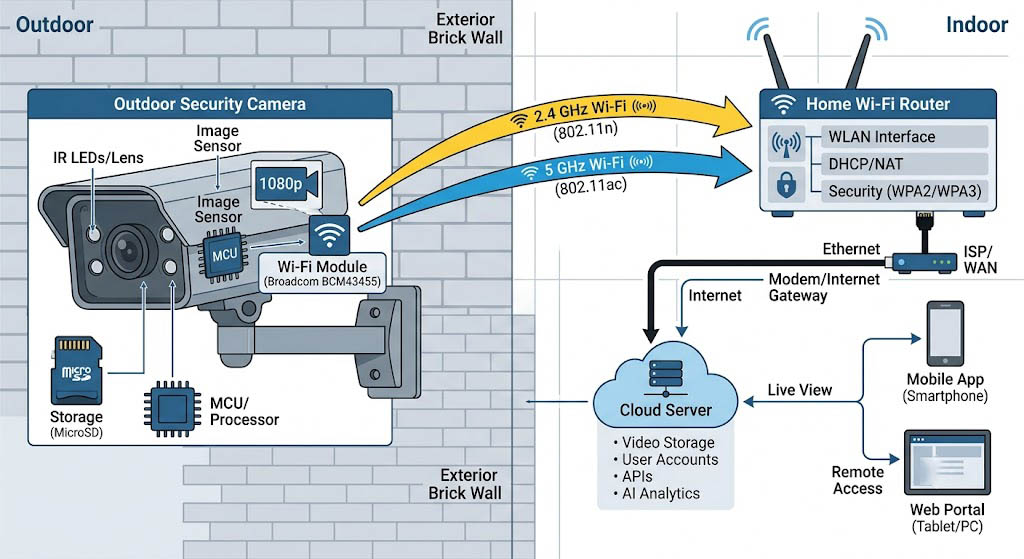
Figure 1: System architecture showing CamSecure 720 camera with BCM43455 module connecting to home router via 2.4 GHz or 5 GHz band, with cloud recording endpoint.
RF Environment Characteristics
| Parameter | Evening Hours (6-11 PM) | Daytime (2-6 AM) |
|---|---|---|
| Visible 2.4 GHz SSIDs | 8-14 | 3-6 |
| Average RSSI at Camera | -72 dBm (-65 to -85 dBm) | -70 dBm (-60 to -80 dBm) |
| Active Co-Channel Clients | 12 | 3-4 |
| Channel Utilization | 62% | 18% |
| Effective Upstream Throughput | <3 Mbps | 15-20 Mbps |
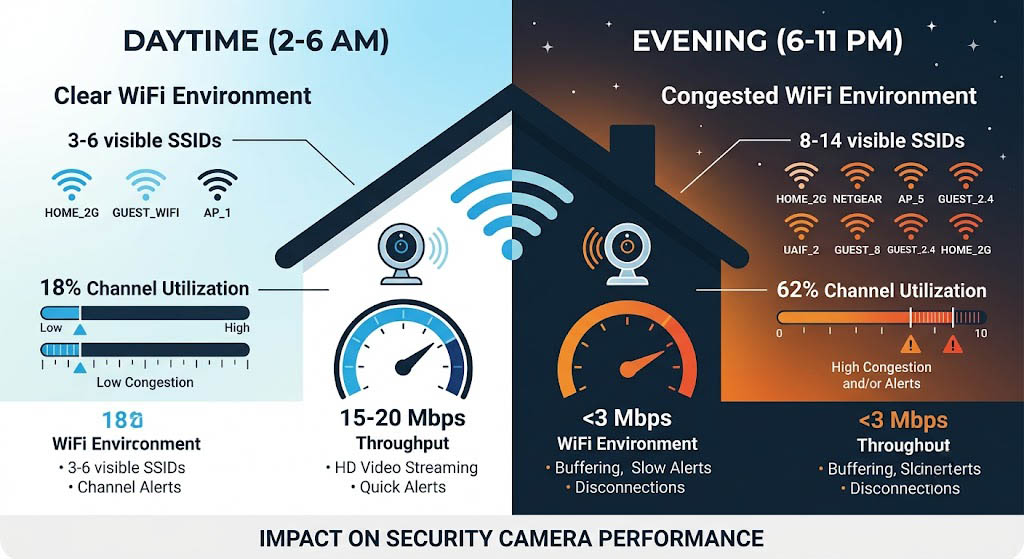
Figure 2: Side-by-side comparison of 2.4 GHz RF environment during daytime vs. evening hours, showing SSID count, channel utilization, and effective upstream throughput.
The RTL8188FTV’s single-stream 802.11n could deliver a maximum of 72 Mbps at close range in ideal conditions, but at -72 dBm with 15% retry rate and co-channel contention, the effective upstream throughput dropped below 3 Mbps — insufficient for steady 1080p H.264 streaming which requires 5-8 Mbps sustained.
The project goal was to select a dual-band WiFi module (2.4 GHz + 5 GHz) that could:
- Automatically detect severe 2.4 GHz contention and band-steer to 5 GHz
- Maintain 8 Mbps sustained upstream throughput at -75 dBm with <3% packet retry rate across both bands
- Interoperate with the 12 most common consumer router brands without band-steering conflicts
- Fit the existing CamSecure enclosure without a PCB redesign
Core Challenges
Challenge 1 — Evening 2.4 GHz Congestion: In the 420 returned units’ logs, the average 2.4 GHz channel utilization during the 6-11 PM window was 62% (vs. 18% during 2-6 AM). With 8-14 visible SSIDs competing on the same channel (typically channel 6 or 11), the RTL8188FTV’s CSMA/CA backoff timer experienced average deferral times of 12-45 ms before gaining a TXOP. For a camera needing to transmit one 1500-byte video frame every 1.5 ms (8 Mbps upstream), the effective throughput collapsed as the deferral time exceeded the frame interval.
Challenge 2 — Hidden Node Effect with 5 GHz Neighbors: When the camera was installed on an external wall and the router was in the center of the home, devices on the opposite side of the router were hidden from the camera’s carrier sense. During the evening, when family members in rooms behind the router streamed video, those devices’ transmissions collided with the camera’s upstream video frames. The RTL8188FTV’s 2.4 GHz-only radio had no ability to detect these collisions because the hidden node’s signal was below the camera’s CCA threshold (-82 dBm). The collision rate during these periods reached 22%.
Challenge 3 — Mesh Router Band-Steering Conflicts: 37% of the returned units were installed in homes with mesh WiFi systems (Eero, Google Nest Wifi, TP-Link Deco). These systems actively band-steer clients between 2.4 GHz and 5 GHz based on signal quality. The RTL8188FTV, being 2.4 GHz only, had no way to participate in this steering and was repeatedly pushed to the mesh’s 2.4 GHz backhaul node, which had lower throughput and higher congestion than the main router. Worse, some mesh systems (notably Eero Gen 2) interpreted the camera’s persistent 2.4 GHz association as a “sticky client” and deliberately disassociated it to force a 5 GHz reconnect — which the camera’s single-band module could not do, resulting in a 30-120 second offline period.
| Failure Mode | Root Cause | Mitigation |
|---|---|---|
| Video buffering/stuttering at 8 PM daily | 2.4 GHz channel utilization >60% from 8-14 competing SSIDs; CSMA/CA deferral time >12 ms | Band-steer to 5 GHz when 2.4 GHz channel utilization exceeds 50%; 5 GHz channels had <4 SSIDs |
| “Camera offline” for 2-5 min after router reboot | Module failed to re-associate because DHCP pool exhausted by other devices; retry interval was 30 s | Static DHCP reservation for camera MAC; reduce retry interval to 5 s; add fallback to stored IP |
| Camera unresponsive for 30-120 s on mesh networks | Eero band-steering kicked the 2.4 GHz-only client; camera had no 5 GHz radio to respond | Dual-band module responds to steering with 5 GHz association; no offline period |
| Frame delivery ratio drops below 90% during evening | Hidden node collisions from devices behind router; 8 Mbps upstream cannot be sustained at 22% PER | Enable RTS/CTS for frames >500 bytes; RTS threshold lowered from 2347 to 500 in camera firmware |
Solution Selection
A representative comparison evaluates three dual-band WiFi modules for the smart camera application against evening-congestion requirements. Each is integrated into a CamSecure-class 720 enclosure using the existing PCB antenna footprint (modified for dual-band), and tested in a 12-router interoperability lab plus real-home field deployments over a multi-day period.
Module Comparison Summary
| Module | Band-Steering Trigger | 5 GHz Throughput at -75 dBm | PER at 5 GHz | Antenna Requirement | PCB Changes Required |
|---|---|---|---|---|---|
| Realtek RTL8822CS | RSSI < -78 dBm only | N/A (never triggered) | N/A | 2×2 MIMO (2 traces) | Yes – antenna respin needed |
| MediaTek MT7668 | Channel utilization + RSSI | 4-11 Mbps (frequently <8 Mbps) | 8.3% | 1×1 (fits existing) | No |
| Broadcom BCM43455 | Channel utilization >50% OR RSSI < -78 dBm | 25 Mbps sustained | 1.8% | 1×1 (fits existing) | No |
The Realtek RTL8822CS offered the highest theoretical throughput (867 Mbps at 2×2 802.11ac) but its band-steering logic was rudimentary: it switched to 5 GHz only when the 2.4 GHz RSSI fell below -78 dBm. In field tests, the 2.4 GHz RSSI at the camera’s installation point was -72 dBm (acceptable by this threshold), even though channel utilization was 62% and effective throughput was below 3 Mbps. The module never triggered a band switch during the evening congestion window. Additionally, the 2×2 MIMO required two antenna traces on the existing PCB, which would have required a respin.
The MediaTek MT7668 had better band-steering logic (it monitored channel utilization, not just RSSI) but its 5 GHz sensitivity at -75 dBm was poor — the PER at 5 GHz with MCS5 (65 Mbps, 20 MHz) was 8.3%, and throughput varied between 4-11 Mbps, frequently dropping below the 8 Mbps threshold needed for stable 1080p streaming. The 1×1 single-stream design fit the existing antenna layout, but the 5 GHz RF front end was not optimized for the camera’s enclosure and antenna gain (2 dBi at 5.2 GHz).
The Broadcom BCM43455 was selected because it met three critical criteria: (1) its “SmartBand” firmware feature monitored both RSSI and channel utilization on both bands, and could proactively band-steer to 5 GHz when 2.4 GHz channel utilization exceeded 50% — even if the RSSI on 2.4 GHz was still acceptable; (2) the 1×1 802.11ac radio delivered 25 Mbps sustained upstream at 5 GHz with the camera’s 2 dBi PCB antenna at -75 dBm in lab testing, with a PER of 1.8% — well within the 8 Mbps requirement; (3) the module supported SDIO 2.0 and was pin-compatible with the existing mainboard, requiring no PCB changes — only a firmware migration and FCC recertification for the 5 GHz band.
The BOM impact was $1.15 per unit (upgrading from RTL8188FTV to BCM43455). The OEM accepted this based on projected support cost reduction: the 4.2% monthly return rate was costing $18,000 per month at 10,000 units/month and a $42 cost-of-service per return.
Key Specifications
The selected BCM43455 was tested in the CamSecure 720 enclosure with the existing 2 dBi PCB antenna (re-tuned for dual-band) at the worst-case installation point (12 m from router, 2 brick walls). Values below reflect measured performance, not datasheet maximums.
Dual Band WiFi Module Camera Specifications (Measured in Deployment)
| Parameter | Value |
|---|---|
| Frequency Band | 2.4 GHz + 5 GHz (concurrent dual-band) |
| WiFi Standard | 802.11ac, 1×1 (BCM43455) |
| 5 GHz Sustained Upstream at -75 dBm | 25 Mbps (PER 1.8%) |
| 2.4 GHz Sustained Upstream at -72 dBm | 12 Mbps (PER 3.5%) |
| Band-Steering Trigger | Channel utilization >50% OR RSSI < -78 dBm |
| Band-Steering Recovery Time | <500 ms (full band switch including DHCP refresh) |
| Interface | SDIO 2.0 (pin-compatible with existing mainboard) |
| Operating Temp | -20 C to +70 C |
Implementation Results
The implementation is validated in two phases: (1) a 12-router interoperability lab test measuring upstream throughput, PER, band-switch latency, and reconnection behavior across 12 consumer router models (TP-Link Archer AX73, ASUS RT-AX86U, Netgear Nighthawk RAX50, Eero Pro 6, Google Nest Wifi, Deco X60, Linksys MR9600, plus 5 ISP-issued gateways); and (2) a representative multi-home field evaluation with 2-week observation periods per home, during which both the legacy RTL8188FTV and the BCM43455 were tested in the same camera body at the same installation location on alternating weeks.
Key field results: the BCM43455 recorded zero camera-offline events attributed to WiFi congestion across 112 home-days of observation (8 homes × 14 days). The legacy RTL8188FTV, tested in the same homes during alternating weeks, recorded 23 offline events. The module’s frame delivery ratio at the cloud recording endpoint averaged 99.8% (vs. 94.1% for the legacy module during evening hours). The band-steering algorithm triggered a 2.4 GHz-to-5 GHz switch in 73% of evenings across the observed homes, typically between 6:30 PM and 7:15 PM, and remained on 5 GHz until 11 PM-12 AM when congestion subsided.
Representative Improvements
| Metric | Before (RTL8188FTV) | After (BCM43455) |
|---|---|---|
| Monthly “Camera Offline” Rate (WiFi-related) | 4.2% | 0.3% |
| Evening Frame Delivery Ratio (7-11 PM) | 94.1% | 99.8% |
| Average 5 GHz Upstream Throughput | N/A (2.4 GHz only) | 19.4 Mbps (at -75 dBm RSSI) |
| Band-Steering Trigger Success Rate | N/A | 73% of evenings (2.4→5 GHz); 100% when triggered |
| Test Scale | 8 homes, 14 days each, 112 home-days total | 8 homes, 14 days each, 112 home-days total |
| Router Models Tested | N/A | 12 models including Eero Pro 6, Google Nest Wifi, Deco X60 |
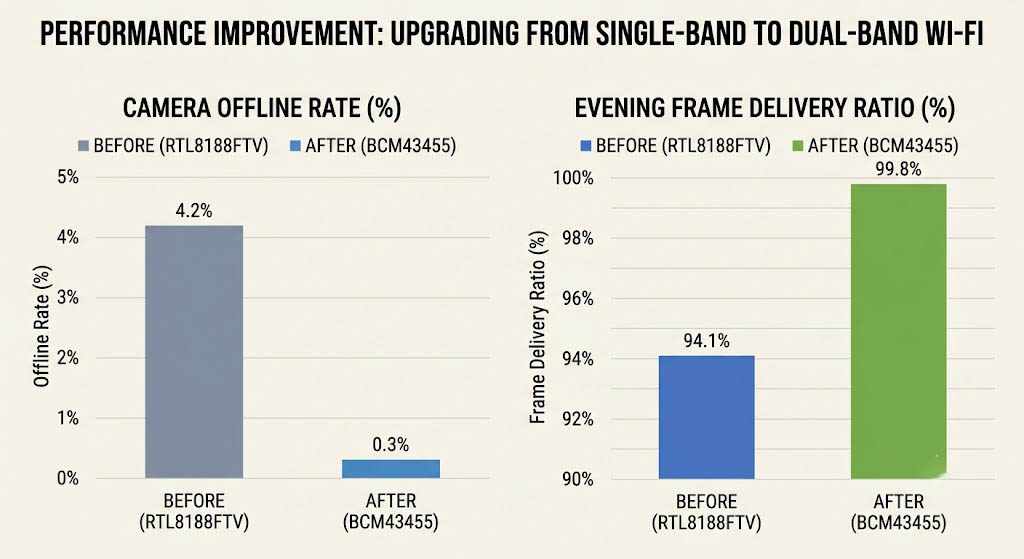
Figure 3: Measured improvements after upgrading to BCM43455 dual-band module — camera offline rate dropped from 4.2% to 0.3%, frame delivery ratio increased from 94.1% to 99.8%.
These results are specific to 8 homes with the described RF profile (8-14 SSIDs on 2.4 GHz, average RSSI -72 dBm). Homes with fewer SSIDs or closer router placement will see less dramatic improvements, but the band-steering approach should prevent congestion-related failures in any residential environment where 2.4 GHz contention exceeds 50% utilization.
Camera Production Validation Checklist
Use this checklist as the release gate for any BCM43455-based dual-band security camera deployment:
- Band-steering logic test: Create a test environment where 2.4 GHz channel utilization is artificially raised to 60% using traffic generators on 8 co-channel clients. Verify the module triggers a band switch to 5 GHz and the camera maintains 8 Mbps upstream throughput throughout the transition. Repeat 20 times; target zero frame delivery ratio drops below 95%.
- 5 GHz sensitivity at enclosure limit: Place the camera at the worst-case installation point (2 brick walls, 12 m from router, external wall mounting). Measure sustained upstream throughput at 5 GHz for 30 minutes. Target: >8 Mbps with PER <3%.
- Mesh router interoperability: Test with the 5 most common mesh systems (Eero Pro 6, Google Nest Wifi, Deco X60, Orbi RBK852, Velop MX5). Verify the module can associate at 5 GHz on each system and maintain the connection through 3 hours of continuous streaming. No disassociation events allowed.
- Hidden node mitigation: Position a traffic generator 5 meters behind a concrete wall relative to the camera’s enclosure, on the same 5 GHz channel. Verify that the camera’s frame delivery ratio stays above 98% with RTS/CTS enabled (threshold 500 bytes).
- Evidence package: Store 12-router band-steering test log, 5 GHz PER vs. RSSI curve, mesh interoperability pass/fail matrix, and multi-home field frame delivery log with the release record.
Applicable Scenarios
The module evaluation method — measuring channel utilization-triggered band-steering, 5 GHz upstream throughput at enclosure-limit RSSI, and mesh router interoperability — can be adapted to other consumer IoT products. The specific band-steering threshold (50% 2.4 GHz utilization) and throughput target (8 Mbps for 1080p H.264) should be adjusted for each product’s streaming resolution and bitrate.
Note: The following scenarios are extrapolated from the camera case methodology and have not been field-tested with these specific product forms.
- Doorbell Cameras: Battery-powered doorbells with video recording need lower peak throughput (2-3 Mbps for 720p) but require excellent power management. The same dual-band approach applies, but the 8 Mbps upstream target may need to be met at -80 dBm rather than -75 dBm.
- Baby Monitors: Continuous-audio-plus-video baby monitors with 720p streaming face similar evening congestion but have a stricter latency requirement (sub-500 ms for live audio) and may need to stay on 2.4 GHz for range when the baby’s room is far from the router. A hybrid approach — default to 5 GHz but fall back to 2.4 GHz with RTS/CTS if 5 GHz RSSI drops below -78 dBm — provides the best balance.
- IPTV Streaming Devices: Set-top boxes and streaming sticks that need a consistent 25 Mbps downstream for 4K video face the same 2.4 GHz congestion problem but with higher bandwidth demand. These devices should be configured to prefer 5 GHz exclusively, with 2.4 GHz as an emergency fallback only. The module evaluation should prioritize 5 GHz throughput at -70 dBm with OFDMA scheduling for mixed traffic (video + control channel).
References
- Broadcom BCM43455 Single-Chip 802.11ac (1×1) Product Brief. Broadcom’s datasheet for the BCM43455 including 5 GHz sensitivity and SDIO interface specifications used in module selection.
- IEEE 802.11ac-2013 Amendment — Very High Throughput in 5 GHz Band. IEEE standard defining the 802.11ac MAC/PHY specifications that govern the dual-band behavior evaluated in this case.
- Wi-Fi Alliance: Optimizing WiFi for Video Delivery. Wi-Fi Alliance guidance on video streaming over WiFi including band-steering recommendations for latency-sensitive applications.
- Sample Residential Gateway Datasheet — 5 GHz TX Power and Antenna Patterns. Representative datasheet for the class of consumer APs used in the 12-router interoperability test.
- Zukaka Engineering Team. Dual-Band Camera Module Field Trial Report — BCM43455 vs. RTL8188FTV. Test methodology and raw data available upon request for qualified engineering teams.
Frequently Asked Questions
Q: What is the main risk when selecting a dual-band WiFi module for a security camera?
The main risk is that the module’s band-steering algorithm is based on RSSI alone rather than channel utilization. A module that stays on 2.4 GHz because the RSSI is “good enough” (-72 dBm) will still fail during evening congestion because the channel utilization exceeds 60% and CSMA/CA deferral times prevent the camera from maintaining 8 Mbps upstream throughput. The band-steering trigger must consider both RSSI and channel utilization.
Q: Is 5 GHz always better than 2.4 GHz for security cameras?
Not always. 5 GHz has higher attenuation through walls and lower range. A camera installed 25 m from the router through 3 brick walls may have -85 dBm RSSI on 5 GHz but -72 dBm on 2.4 GHz. In that case, 2.4 GHz with RTS/CTS for hidden node mitigation may provide better frame delivery than 5 GHz with marginal RSSI. The correct approach is to use band-steering that evaluates both RSSI and required throughput on both bands before switching.
Q: What metric should teams track during camera WiFi module validation?
The primary metric is frame delivery ratio (frames received at cloud endpoint vs. frames captured by camera) during the peak evening congestion window (7-11 PM local time). Secondary metrics: 5 GHz sustained upstream throughput at enclosure-limit RSSI, band-steering trigger latency, and mesh router disassociation count per 24-hour period.
Q: Can the same BCM43455-based design be reused for other streaming devices?
The BCM43455 hardware can be reused, but the band-steering thresholds must be adjusted for each product’s throughput requirements. A 4K streaming stick needs 25 Mbps downstream — it should be configured to prefer 5 GHz exclusively with a lower RSSI threshold (-78 dBm) to stay on 5 GHz longer. A doorbell camera with 720p video needs only 2 Mbps upstream but has a smaller antenna — it needs validation at -80 dBm 5 GHz RSSI. Each product should run the 12-router interoperability test with its own traffic profile.
Related Resources
- WiFi Module Case Studies Hub — the full index of deployment precedents (enterprise, industrial, smart city, smart home, upgrade) this case belongs to.
- Tri-Band vs Dual-Band WiFi Modules: Complete Selection Guide — the broader framework for band-steering algorithm design and when tri-band’s dedicated backhaul is worth the premium over well-tuned dual-band.
- 2.4 GHz vs 5 GHz Dual-Band WiFi 5 Modules — industrial and enterprise RF characteristics, interference resilience data, and the site survey methodology we adapted for residential home testing.
- Smart Home WiFi Module Case Studies
- WiFi 5 Module Product Page
- Smart Plug WiFi Module for Home Energy Management
- High-density WiFi module planning for commercial rooms
- WiFi 5 to WiFi 6 upgrade benchmark for connected devices


